
Exploring Scale Factor
Loading the math board and drawing, please wait…
In collections
Unit 7 Similar Triangles
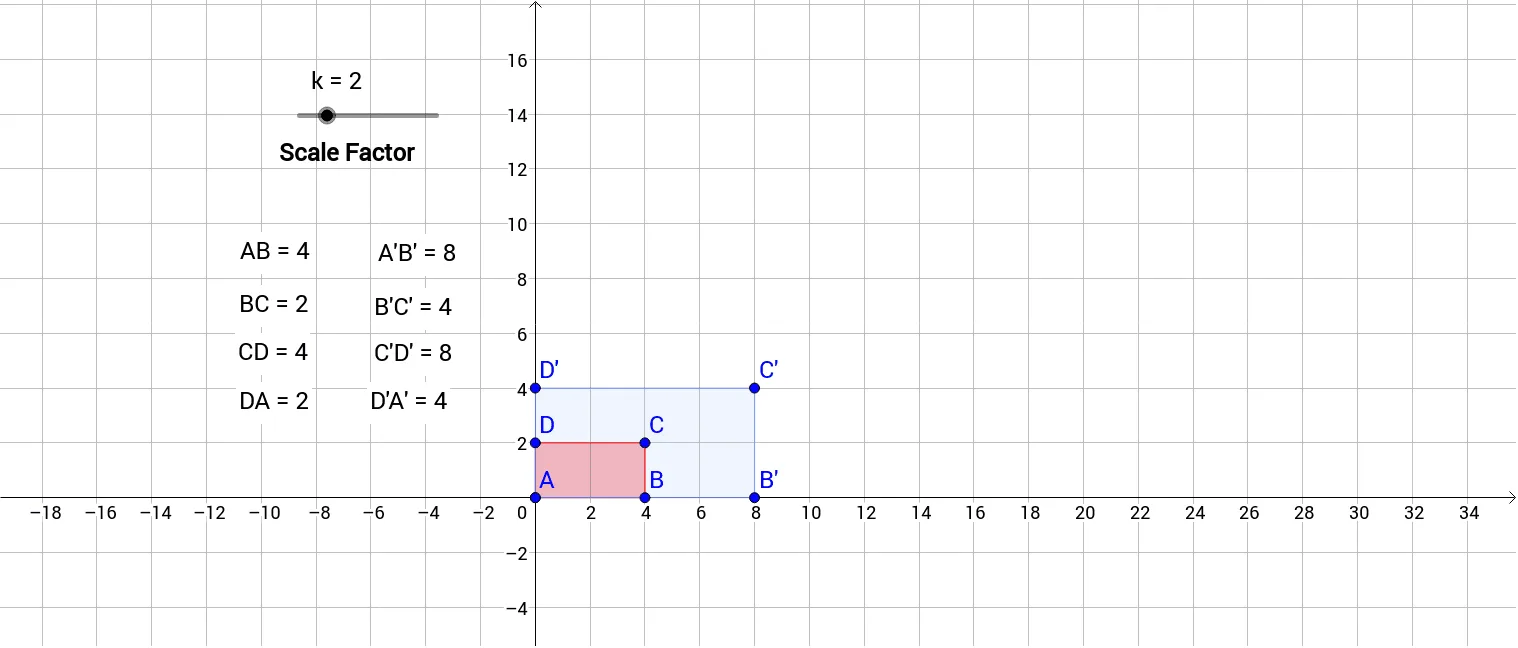
This example demonstrates how dimensions change by adjusting the scale factor. It covers the concept of scaling transformations, using commands like Polygon, Intersect, Dilate, and Distance. Suitable for middle school and above students learning geometric transformations.
GeoGebra Commands & Parameters
Polygon(A, B, C, D) → poly1, a_1, b_1, c_1, d_1Intersect(xAxis, yAxis) → EDilate(A, k, E) → A'Dilate(B, k, E) → B'Dilate(C, k, E) → C'Dilate(D, k, E) → D'Polygon(A', B', C', D') → poly1', a', b', c', d'Distance(D', C') → distanceD'C'Distance(C', B') → distanceC'B'Distance(B', A) → distanceB'ADistance(D', A) → distanceD'ADistance(A, B) → distanceABDistance(C, D) → distanceCDDistance(D, A) → distanceDADistance(A, B') → distanceAB'Distance(B', C') → distanceB'C'Distance(C', D') → distanceC'D'Distance(D', A) → gDistance(B, C) → distanceBC
AI Drawing Prompt Reference
Draw a quadrilateral and its diagonals' intersection point. Use a slider to control the scale factor, dilate the quadrilateral from the intersection point by the scale factor, and draw both the original and dilated quadrilaterals. Measure and display the side lengths of both quadrilaterals and the distances between opposite sides to observe how the scale factor affects them.
The prompt above was compiled from the original drawing commands and is for reference only.