
Exploring Rotations Around Points in the Coordinate Plane
Loading the math board and drawing, please wait…
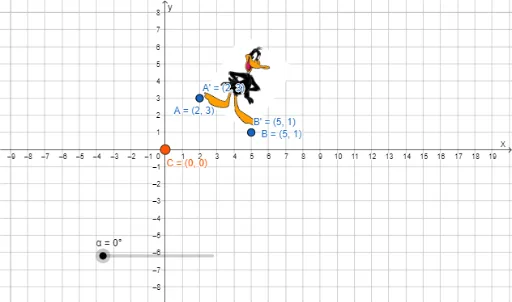
This GeoGebra example demonstrates rotation transformations about a point in the coordinate plane. Users can explore how geometric figures and their vertices transform under rotation by specifying a center point and angle. Core mathematical concepts include rotational symmetry, angle measurement, coordinate geometry, and transformation rules. The construction utilizes the Rotate command with objects such as points C, A, B, and angle α to generate rotated images A' and B'. Ideal for middle and high school mathematics, geometry classes, and students learning about rigid motions and coordinate transformations.
GeoGebra Commands & Parameters
Rotate(pic2, α, C) → pic2'Rotate(A, α, C) → A'Rotate(B, α, C) → B'
AI Drawing Prompt Reference
Draw a coordinate plane with a rotation center point marked. Place a geometric figure, such as a triangle, with its vertices labeled. Then rotate the entire figure around the center point by a specified angle (e.g., 60 degrees), producing a new rotated figure. Label the original vertices and their corresponding rotated positions. Use dashed lines to connect each original vertex to the center and each rotated vertex to the center, showing the rotation paths. Clearly indicate the center point and the rotation angle, and keep the coordinate grid visible for reference.
The prompt above was compiled from the original drawing commands and is for reference only.