
Exploring Pyramid Volume with GeoGebra
Loading the math board and drawing, please wait…
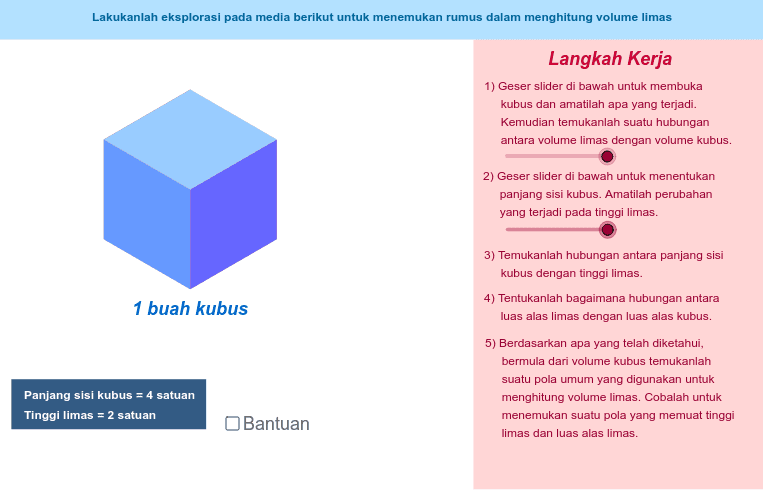
This GeoGebra example demonstrates a dynamic model for finding the volume of a pyramid, showing how the base polygon, apex, height, and slant edges relate to the formula V = 1/3 Sh. It covers solid geometry, pyramid volume, base area, height, trigonometric relationships, and polygon construction. The construction uses Point to create vertices and auxiliary points, Segment to draw edges and heights, Polygon to form the base or cross-sections, Midpoint to locate reference points, and Rotate to generate transformed points such as E′, F′, E″, and F″. Objects including A, B, C, D, E, F, G, H, I, J, K, L, M, N and labels a_1, d_1, e_1 support the interactive visualization. It is suitable for middle-school to high-school geometry lessons, math labs, and teacher demonstrations.
GeoGebra Commands & Parameters
Point(Circle[A, r]) → BPoint(Circle[A, r]) → CPoint(Circle[C, r]) → DPoint(Circle[B, (2 * r)]) → ESegment(B, E) → ePoint(Circle[D, (2 * r)]) → FSegment(D, F) → fRotate(E, α, B) → E'Rotate(F, α, D) → F'Segment(B, E') → gSegment(D, F') → hPoint(g) → GPoint(h) → HRotate(E', α / 2, G) → E''Rotate(F', α / 2, H) → F''Point(Circle[C, r]) → ISegment(C, I) → pPoint(Circle[D, r]) → JSegment(D, J) → qRotate(C, α / 2, C) → C'Rotate(I, α / 2, C) → I'Rotate(D, α / 2, D) → D'Rotate(J, α / 2, D) → J'Point(Circle[A, r]) → KSegment(A, K) → tPoint(Circle[B, r]) → LSegment(B, L) → a_1Rotate(B, (-α), B) → B'Rotate(L, (-α), B) → L'Rotate(A, (-α), A) → A'Rotate(K, (-α), A) → K'Point(Circle[A, r]) → MSegment(A, M) → d_1Point(Circle[C, r]) → NSegment(C, N) → e_1Rotate(A, (-(α / 2)), A) → A'_1Rotate(M, (-(α / 2)), A) → M'Rotate(C, (-(α / 2)), C) → C'_1Rotate(N, (-(α / 2)), C) → N'Midpoint(H, E'') → OMidpoint(D, G) → PMidpoint(C, B) → QMidpoint(A, L') → RMidpoint(N', A) → SMidpoint(I', D) → TPoint(Circle[P, r / 2]) → USegment(P, U) → i_1Rotate(U, α / 2, P) → U'Point(Circle[O, r / 2]) → VSegment(O, V) → n_1Rotate(V, α / 2, H) → V'Point(Circle[T, r / 2]) → WSegment(T, W) → t_1Point(Circle[Q, r / 2]) → ZSegment(Q, Z) → a_2Point(Circle[R, r / 2]) → A_1Segment(R, A_1) → b_2Point(Circle[S, r / 2]) → B_1Segment(S, B_1) → c_2Rotate(A_1, (-(α / 2)), R) → C_1Rotate(B_1, (-α), S) → D_1Rotate(W, α, T) → W'Polygon(Z, E_1, B) → poly3, b_1, z, e_2Polygon(Z, D, B) → poly4, b_3, z_1, dPolygon(E_1, K', L', B) → poly1, e_3, k', l', bPolygon(C_1, L', B) → poly2, b_4, c_1, l'_1Polygon(K', L', C_1) → poly5, c_3, k'_1, l'_2Polygon(D, B, G, H) → poly6, d_2, b_5, g_1, h_1Polygon(U', B, G) → poly7, g_2, u', b_6Polygon(U', H, G) → poly8, g_3, u'_1, h_2Polygon(H, F'', E'', G) → poly9, h_3, f'', e'', g_4Polygon(V', E'', F'') → poly10, f''_1, v', e''_1Polygon(V', G, E'') → poly11, e''_2, v'_1, g_5Polygon(W', D, J') → poly12, j', w', d_3Polygon(C, W', D) → poly13, d_4, c, w'_1Polygon(J', I', W') → poly14, w'_2, j'_1, i'Polygon(D_1, E_1, Z) → poly15, z_2, d_5, e_4Polygon(D_1, N', M') → poly16, m', d_6, n'Polygon(M', E_1, D_1) → poly17, d_7, m'_1, e_5Polygon(F_1, G_1, H_1, I_1) → poly18, f_1, g_6, h_4, i_2Polygon(J_1, K_1, L_1, M_1) → poly19, j_1, k_1, l_1, m_1Polygon(N_1, O_1, P_1, Q_1) → poly20, n_2, o_1, p_1, q_1
AI Drawing Prompt Reference
Create a dynamic model to explore the volume of a pyramid, showing how the base polygon, apex, height, and slant edges relate to the formula V=1/3Sh. Construct the base polygon and apex, then draw the height and slant edges. Generate side faces using rotations and auxiliary points, labeling key points like G, H, E'', F''. Finally, calculate midpoints O, P, Q, R, S, T, and draw auxiliary circles and lines to fully present the geometric relationships and volume calculation.
The prompt above was compiled from the original drawing commands and is for reference only.