
Exploring Properties of Isosceles Trapezoids
Loading the math board and drawing, please wait…
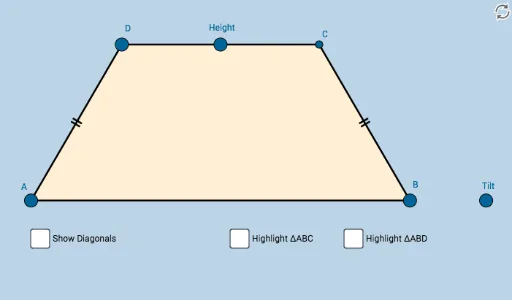
This applet demonstrates the properties of isosceles trapezoids, including their definition, properties, and related geometric transformations. Using commands such as Line, Ray, Point, Midpoint, Slope, OrthogonalLine, Mirror, Dilate, Segment, Circle, Intersect, Vector, Translate, Angle, Rotate, Polygon, Distance, the applet helps students understand the geometric characteristics of isosceles trapezoids. Suitable for middle school and above students to learn about geometric transformations and isosceles trapezoids.
GeoGebra Commands & Parameters
Line(A, B_1) → aRay(A, B_1) → bPoint(b) → BMidpoint(A, B) → D_1Line(A, B) → cSlope(c) → dOrthogonalLine(D_1, c) → gPoint(g) → E_1Ray(D_1, E_1) → hPoint(h) → FSlope(h) → iLine(F, c) → lPoint(l) → GPoint(l) → HRay(F, G) → mRay(F, H) → nPoint(m) → DMirror(D, h) → I'Dilate(A, If[0 < o ≤ 1, 1 - o, 0], B) → A'Segment(A, A') → pDilate(A, If[1 < o ≤ 2, 2 - o, 0], D) → A'_1Segment(A, A'_1) → qSegment(A, B) → rSegment(B, I') → sSegment(I', D) → tSegment(D, A) → a_1Circle(A, (0.2 * Min[a_1, r])) → c_1Circle(D, (0.2 * Min[a_1, r])) → d_1Intersect(d_1, a_1, 1) → JIntersect(d_1, t, 1) → KIntersect(c_1, r, 1) → LIntersect(c_1, a_1, 1) → MDilate(D, If[2 < o ≤ 3, 3 - o, 0], I') → I'_1Segment(D, I'_1) → b_1Dilate(A, If[3 < o ≤ 4, 4 - o, 0], B) → A'_2Vector(A, A'_2) → uTranslate(A, u) → A'_3Translate(A'_1, u) → NSegment(A'_3, N) → q'OrthogonalLine(A, r) → g_1Point(g_1) → OAngle(D, A, O) → αAngle(I', B, A) → βRotate(A'_3, If[4 < o ≤ 5, (((o - 4) * 2) * α), (2 * α)], B) → PRotate(N, If[4 < o ≤ 5, (((o - 4) * 2) * α), (2 * α)], B) → CSegment(P, C) → q''Dilate(A, If[5 < o ≤ 6, 6 - o, 0], B) → A'_4Vector(A, A'_4) → vDilate(D, If[7 < o ≤ 8, 8 - o, 0], I') → I'_2Vector(D, I'_2) → wDilate(A, If[9 < o ≤ 10, 10 - o, 0], I') → A'_5Segment(A, A'_5) → i_1Dilate(A, If[10 < o ≤ 11, 11 - o, 0], D) → A'_6Vector(A, A'_6) → u_1Translate(A, u_1) → A'_7Translate(A'_5, u_1) → QSegment(A'_7, Q) → j_1Segment(D, B) → l_1Angle(L, A, I') → γRotate(A'_7, If[11 < o ≤ 12, ((-(o - 11)) * (2 * γ)), (-2 * γ)], D) → RRotate(Q, If[11 < o ≤ 12, ((-(o - 11)) * (2 * γ)), (-2 * γ)], D) → Q'Segment(R, Q') → m_1Polygon(A, B, I', D) → poly1, a_2, c_2, i', i_2Intersect(i_1, m_1) → EDistance(A, E) → distanceASDistance(E, C) → distanceSN'Distance(E, B) → distanceSCDistance(E, D) → distanceSIAngle(B, A, E) → δAngle(E, B, A) → εAngle(C, B, E) → ζAngle(E, A, D) → ηAngle(A, D, E) → θAngle(E, D, C) → ιAngle(D, C, E) → κAngle(B, E, C) → λAngle(E, C, B) → μAngle(A, E, B) → νPolygon(A, B, C) → poly2, c_3, a_3, b_2Segment(A, C) → h_1Mirror(A, h_1) → A'_8Mirror(B, h_1) → B'Mirror(C, h_1) → C'Polygon(A'_8, B', C') → poly2', c', a'_8, b'Polygon(D, A, B) → poly3, b_3, d_2, a_4Segment(D, B) → p_1Mirror(D, p_1) → D'Mirror(A, p_1) → A'_9Mirror(B, p_1) → B'_1Polygon(D', A'_9, B'_1) → poly3', b'_1, d', a'_9
AI Drawing Prompt Reference
Draw an isosceles trapezoid to illustrate its properties. Start by drawing two parallel line segments as the bases, then two non-parallel but equal line segments as the legs. Mark the midpoint of the bases and draw a perpendicular line. Use the midpoint and the perpendicular line to locate the top vertices of the trapezoid and draw the diagonals. Next, demonstrate the symmetry and geometric transformations of the trapezoid through reflections, dilations, and rotations. Finally, add a slider to dynamically adjust the shape and transformation parameters of the trapezoid.
The prompt above was compiled from the original drawing commands and is for reference only.