
Exploring Linear Function Parameters and Their Graphs
Loading the math board and drawing, please wait…
In collections
学习 GeoGebra 经典应用
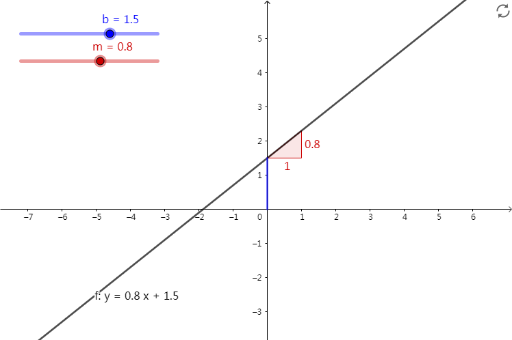
This GeoGebra applet demonstrates how the slope m and y-intercept b affect the position and orientation of a linear function y=mx+b. The core mathematical concepts include the algebraic form of linear functions, the geometric meaning of slope (indicating the steepness of a line), and the geometric meaning of intercept (the coordinate where the line crosses the axes). The construction uses Intersect command to find intersection points with coordinate axes, Segment command to draw directed line segments showing slope's geometric interpretation, and Slope command to dynamically calculate and display slope values. Additionally, sliders m and b are used to control parameter changes, allowing students to intuitively observe how the line translates and rotates when parameters vary. Suitable for middle school students learning linear functions in Grade 7, or for reviewing the geometric meanings of slope and intercept.
GeoGebra Commands & Parameters
Intersect(f, yAxis) → AIntersect(xAxis, yAxis) → BSegment(B, A) → gSlope(f) → m_1
AI Drawing Prompt Reference
Create a coordinate-plane diagram showing the graph of a linear function y = mx + b. Determine the intersection point of the line with the y-axis, and also mark the origin where the axes meet as a reference point. Draw a directed segment connecting the origin to the y-axis intersection to visually represent the line’s orientation and geometric meaning. Compute and display the slope value of the function. Include sliders for m and b so that changing them rotates the line and shifts it vertically, with the displayed slope updating accordingly.
The prompt above was compiled from the original drawing commands and is for reference only.