
Exploring Eccentricity
Loading the math board and drawing, please wait…
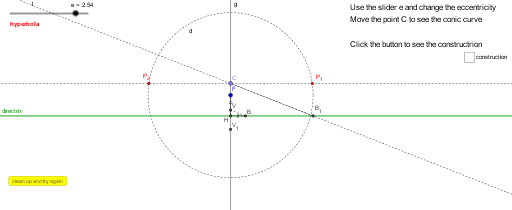
This example uses GeoGebra to demonstrate the eccentricity of a hyperbola. Eccentricity is a key parameter that describes the shape of a hyperbola. By constructing the foci, directrix, and eccentricity of the hyperbola, students can visually understand the definition and relationship of eccentricity with the shape of the hyperbola. Commands used include Intersect, Segment, Circle, Point, Line, and others. Suitable for high school mathematics education and learning.
GeoGebra Commands & Parameters
Intersect(g, directrix) → HSegment(V, H) → hSegment(F, V) → iCircle(H, i) → cIntersect(c, directrix) → A, BSegment(H, B) → jSegment(V, B) → kPoint(g) → CLine(C, k) → lIntersect(l, directrix) → B_1Line(C, directrix) → mSegment(C, B_1) → nSegment(H, B_1) → pCircle(F, p) → dIntersect(d, m) → P_2, P_1
AI Drawing Prompt Reference
Draw a hyperbola by first determining the focus F and the directrix. Construct the center V and the asymptote using the focus and directrix. Then draw the two vertices A and B, and the line segment from the focus F to vertex B. Draw the tangent line l from vertex B to center V, and find its intersection B1 with the directrix. Draw the line segment from vertex B to center V, construct a circle d with the focus F as the center and the line segment as the radius, and find the intersections P1 and P2 with the tangent line l.
The prompt above was compiled from the original drawing commands and is for reference only.