
Exploring Dilations in the Coordinate Plane
Loading the math board and drawing, please wait…
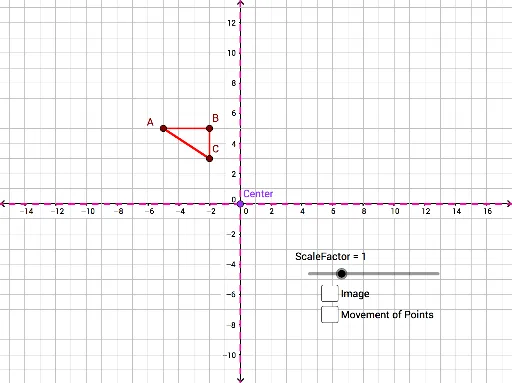
This example demonstrates how to perform dilation transformations on the coordinate plane. The core math concepts involved include dilation, ellipse, isosceles triangles, bar chart or bar graph, area, and parametric curves. Construction highlights: using GeoGebra commands/objects like Polygon, Dilate, Segment, Line; objects: A, B, C, poly1, c, a, b, Center, ScaleFactor, A', B', C', poly1', c', a', b', f, g, h, i, j, k, d, e, center, D, E, l, F, m, n, p, q. Suitable for high school mathematics curriculum, to understand and apply dilation transformations.
GeoGebra Commands & Parameters
Polygon(A, B, C) → poly1, c, a, bDilate(A, ScaleFactor, Center) → A'Dilate(B, ScaleFactor, Center) → B'Dilate(C, ScaleFactor, Center) → C'Polygon(A', B', C') → poly1', c', a', b'Segment(Center, C) → fSegment(C, C') → gSegment(Center, A) → hSegment(A, A') → iSegment(Center, B) → jSegment(Center, B') → kLine(D, E) → lLine(F, E) → mLine(Center, l) → nLine(Center, m) → pLine(Center, p) → q
AI Drawing Prompt Reference
Draw a geometric diagram in the coordinate plane to illustrate a central dilation transformation. Start by creating a triangle, then dilate each vertex of the triangle from a central point by a given scale factor to form a new triangle. Connect the central point to each vertex and its corresponding dilated point with line segments. Add two auxiliary lines and draw three lines from the center parallel to these lines, creating a visual representation of the dilation transformation and its properties.
The prompt above was compiled from the original drawing commands and is for reference only.