
Exploring AAS/SAA Congruence
Loading the math board and drawing, please wait…
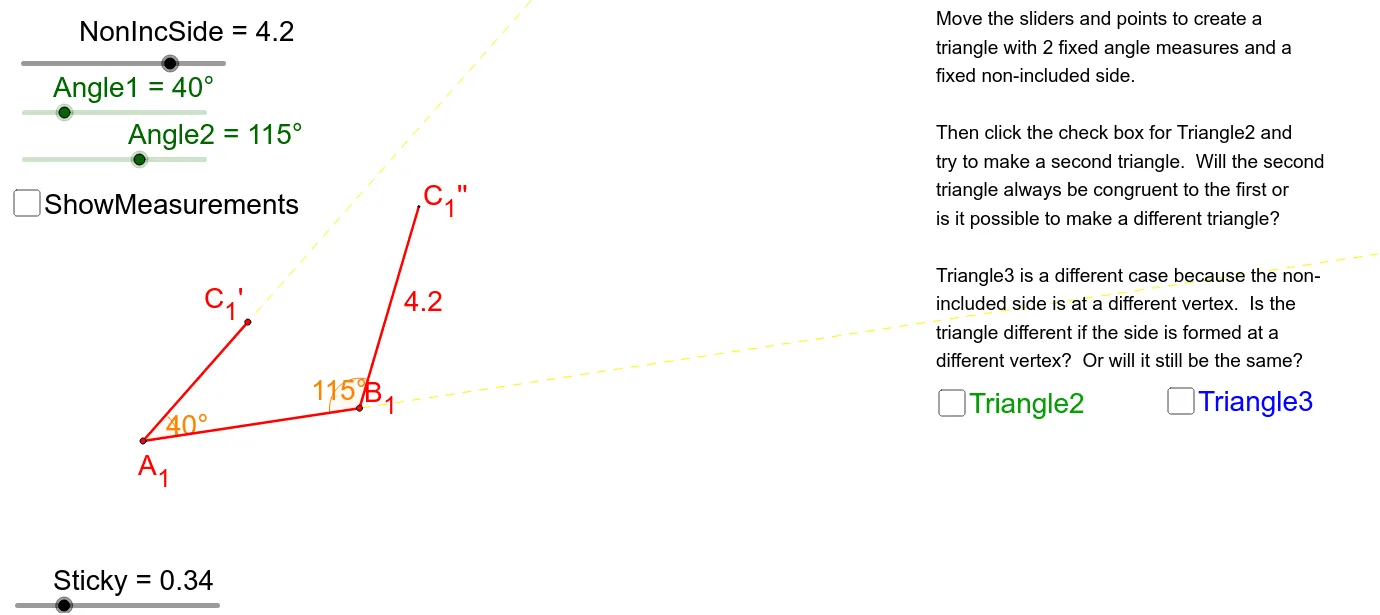
This example demonstrates the geometric phenomenon of triangle congruence using Angle-Angle-Side (AAS) or Angle-Angle-Angle (SAA) criteria. Core mathematical concepts include triangle congruence theorems, angle measurement, segment length comparison, and dynamic geometric interaction. Construction highlights involve GeoGebra commands/objects like Circle, Rotate, Ray, Point, Intersect, DynamicCoordinates, Angle, Segment, and If, as summarized. Suitable for high school students learning triangle congruence criteria and geometric construction demonstrations.
GeoGebra Commands & Parameters
Circle(A_2, Side3) → c_1Circle(A_2, Side2) → d_1Rotate(A_2, (-Angle1), A_2) → JRotate(G, (-Angle1), A_2) → G'Ray(J, G') → b_1Point(b_1) → InvC_3Intersect(d_1, b_1, 1) → C_3DynamicCoordinates(InvC_3, If[Distance[C_3, InvC_3] < Sticky, x(C_3), x(InvC_3)], If[Distance[C_3, InvC_3] < Sticky, y(C_3), y(InvC_3)]) → C_2''Ray(A_2, G) → a_1Intersect(c_1, a_1, 1) → B_4Point(a_1) → InvB_3DynamicCoordinates(InvB_3, If[Distance[B_4, InvB_3] < Sticky, x(B_4), x(InvB_3)], If[Distance[B_4, InvB_3] < Sticky, y(B_4), y(InvB_3)]) → B_2Circle(B_2, 0.1) → e_1Intersect(e_1, a_1) → K, LRotate(K, Angle2, B_2) → K'Ray(B_2, K') → f_1Circle(B_2, NonIncSide) → g_1Intersect(g_1, f_1) → C_2',Ray(A_3, E) → kPoint(k) → InvB_2Rotate(E, Angle1, A_3) → E'Rotate(A_3, Angle1, A_3) → FRay(F, E') → k'Circle(A_3, WrongSide3) → qIntersect(q, k, 1) → B_5DynamicCoordinates(InvB_2, If[Distance[B_5, InvB_2] < Sticky, x(B_5), x(InvB_2)], If[Distance[B_5, InvB_2] < Sticky, y(B_5), y(InvB_2)]) → B_3Circle(B_3, 0.1) → rIntersect(r, k) → H, IRotate(H, (-Angle2), B_3) → H'Ray(B_3, H') → mPoint(m) → InvC_2Circle(B_3, WrongSide1) → sIntersect(s, m, 1) → C_2DynamicCoordinates(InvC_2, If[Distance[C_2, InvC_2] < Sticky, x(C_2), x(InvC_2)], If[Distance[C_2, InvC_2] < Sticky, y(C_2), y(InvC_2)]) → C_3'Circle(A_3, NonIncSide) → pIntersect(p, k', 1) → C_3''Ray(A_1, A) → aCircle(A_1, Side3) → cIntersect(c, a, 1) → BPoint(a) → InvBDynamicCoordinates(InvB, If[Distance[B, InvB] < Sticky, x(B), x(InvB)], If[Distance[B, InvB] < Sticky, y(B), y(InvB)]) → B_1Rotate(A_1, Angle1, A_1) → C_1Rotate(A, Angle1, A_1) → A'Ray(C_1, A') → a'Circle(A_1, Side2) → dIntersect(d, a', 1) → CPoint(a') → InvCDynamicCoordinates(InvC, If[Distance[C, InvC] < Sticky, x(C), x(InvC)], If[Distance[C, InvC] < Sticky, y(C), y(InvC)]) → C_1'Circle(B_1, NonIncSide) → eAngle(B_1, A_1, C_1') → αSegment(A_1, B_1) → fSegment(A_1, C_1') → gPoint(f) → DRotate(D, (-Angle2), B_1) → D'Ray(B_1, D') → bCircle(B_1, NonIncSide) → hIntersect(h, b, 1) → C_1''Segment(B_1, C_1'') → iAngle(C_1'', B_1, A_1) → βIf(Distance[C_1', C_1''] < 0.2, Polygon[A_1, B, C]) → poly1If(Distance[C_3', C_3''] < 0.2, Polygon[A_3, B_5, C_3'']) → poly2Segment(A_3, C_3'') → lAngle(B_5, A_3, C_3'') → γAngle(C_2, B_3, A_3) → δSegment(A_3, B_3) → nSegment(B_3, C_3') → tAngle(C_3, A_2, B_4) → εAngle(A_2, B_2, C_2') → ζSegment(A_2, B_2) → h_1If(Distance[C_2', C_2''] < 0.2, Polygon[A_2, B_2, C_2'']) → poly3Segment(B_2, C_2') → i_1Segment(C_2'', A_2) → j_1
AI Drawing Prompt Reference
Draw two triangles to demonstrate the AAS or SAA congruence condition. Start by drawing a circle with one vertex as the center and a segment as the radius, then rotate an angle to find the second vertex. Connect the vertices and find intersections to draw circles and segments. Dynamically display the coordinates of the intersection points. Repeat the process to draw the second triangle, showing the congruence relationship.
The prompt above was compiled from the original drawing commands and is for reference only.