
Explore Trig Ratios
Loading the math board and drawing, please wait…
In collections
Unit 9: Right Triangles and Trigonometry
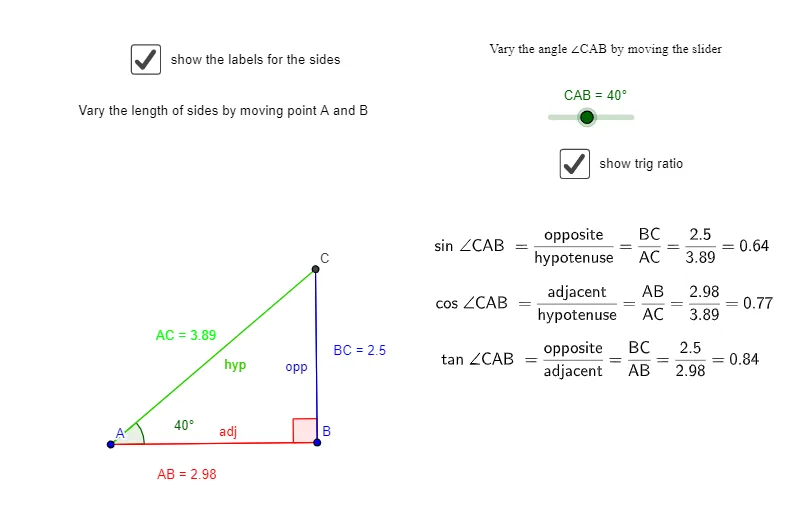
This example dynamically demonstrates the basic concepts of trigonometric ratios, helping students understand sine, cosine, and tangent. By rotating and measuring angles, students can intuitively see how angle changes affect trigonometric ratios. The construction summary uses commands such as Segment (线段), Rotate (旋转), Angle (角度), OrthogonalLine (垂线), Line (直线), and Intersect (交点). Suitable for middle school and above students to learn the basic properties and applications of trigonometric functions.
GeoGebra Commands & Parameters
Segment(A, B) → ABRotate(B, CAB, A) → B'Angle(B, A, B') → β_2OrthogonalLine(B, AB) → bLine(A, B') → cIntersect(b, c) → CSegment(A, C) → ACSegment(B, C) → BCAngle(C, B, A) → αSegment(C, B) → fSegment(A, C) → hypotenuseSegment(A, B) → i
AI Drawing Prompt Reference
Draw a right triangle with one leg horizontal and the other vertical. From the right endpoint of the horizontal leg, draw a perpendicular line upward. From the left endpoint of the horizontal leg, draw a ray that intersects this perpendicular line, marking the intersection as the triangle's top vertex. Connect this vertex to both endpoints of the horizontal leg to form the triangle. At the right endpoint of the horizontal leg, indicate the acute angle between the horizontal leg and the hypotenuse using an arc and label its measure. Also mark the right angle at the vertex where the two legs meet. The diagram illustrates how sine, cosine, and tangent relate to the angle.
The prompt above was compiled from the original drawing commands and is for reference only.