
Explore Equivalent Fractions
Loading the math board and drawing, please wait…
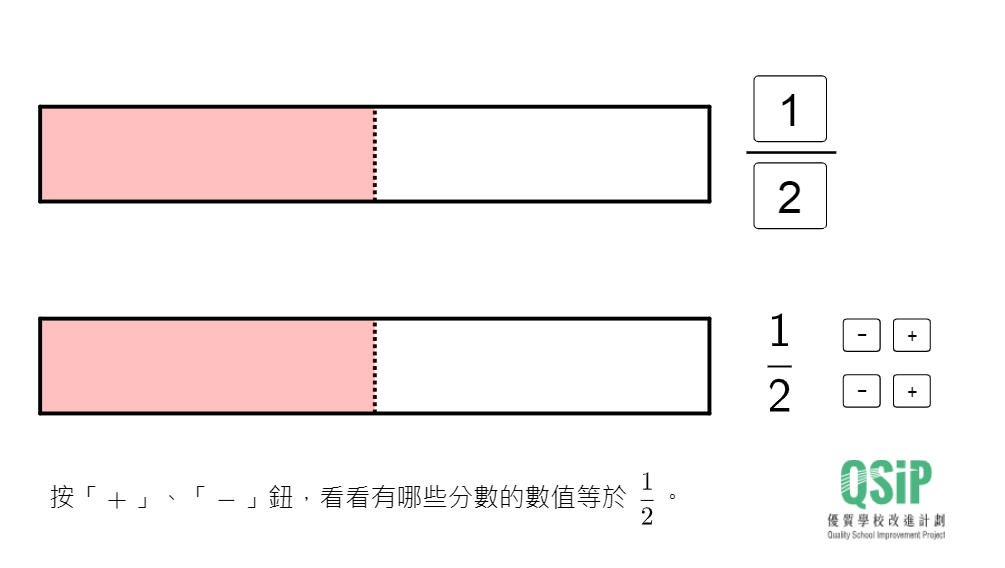
This example demonstrates how to find equivalent fractions through transformations. Key mathematical concepts include fractions and equivalence. It uses commands like Sequence, If, Element, Point, Polygon, Textfield, and Corner in GeoGebra. Suitable for high-grade elementary or junior high school students to learn basic concepts of fractions and equivalence.
GeoGebra Commands & Parameters
Sequence(B + ((i * l / q), w), i, 1, p) → list3, {(6, 1.2)}If(q > 9 ∨ p > 9, true, false) → digit2If(digit2, (9.1, -2.75), (8, -2.75)) → Q2If(digit2, (6.8, -2.75), (6, -2.75)) → Q1If(digit2, (9.1, -1.6), (8, -1.6)) → P2If(digit2, (6.8, -1.6), (6, -1.6)) → P1Element(list3, u) → PSequence(B + (i * (x(P) - x(B), 0)), i, 1, floor(l / (x(P) - x(B)))) → list4, {(6, -0.5), (12, -0.5)}Point(list4) → P'Polygon(B, B + (l, 0), B + (l, w), B + (0, w)) → poly2, a_2, b_2, c_2, d_2Polygon(A, A + (l, 0), A + (l, w), A + (0, w)) → poly1, a_1, b_1, c_1, d_1Sequence(Segment[A + ((i * l / q), 0), A + ((i * l / q), w)], i, 1, q - 1) → list1, {1.7000000000000002}Polygon(A, A + ((p * l / q), 0), A + ((p * l / q), w), A + (0, w)) → poly3, a, b, c, dPolygon(B, B + ((p1 * l / q1), 0), B + ((p1 * l / q1), w), B + (0, w)) → poly4, f, m, n, eSequence(Segment[B + ((i * l / q), 0), B + ((i * l / q), w)], i, 1, q - 1) → list2, {1.7}Textfield(p) → inputBox1Textfield(q) → inputBox2Sequence(Polygon[B + (i * (x(P) - x(B), 0)), B + ((i * (x(P) - x(B))), w), B + (((i - 1) * (x(P) - x(B))), w), B + ((i - 1) * (x(P) - x(B), 0))], i, 1, (x(P') - x(B)) / (x(P) - x(B))) → list5, {10.2}Sequence(Segment[A + ((i * l / q), 0), A + ((i * l / q), w)], i, 1, q - 1) → list1_1, {1.7000000000000002}Sequence(Sequence[Segment[B + ((i * l / q) + (j * l / ((q * r))), 0), B + ((i * l / q) + (j * l / ((q * r))), w)], i, 0, q - 1], j, 1, r - 1) → list6, {{1.7, 1.7}}If(ans1 ≟ (r * p), true, false) → correct1If(ans2 ≟ (r * q), true, false) → correct2Polygon(P1, P1 + (1.3, 0), P1 + (1.3, -1), P1 + (0, -1)) → poly5, f_1, g_1, h_1, i_1Polygon(Q1, Q1 + (1.3, 0), Q1 + (1.3, -1), Q1 + (0, -1)) → poly6, j_1, k_1, l_1, m_1Polygon(Q2, Q2 + (1.3, 0), Q2 + (1.3, -1), Q2 + (0, -1)) → poly8, s_1, t_1, e_1, f_2Polygon(P2, P2 + (1.3, 0), P2 + (1.3, -1), P2 + (0, -1)) → poly7, n_1, p_1, q_1, r_1Corner(text1, 3) → EIf(Length[list4] ≠ 1 ∧ IndexOf[P', list4] ≠ Length[list4], true, false) → arrowSequence(Segment[B + (i * (x(P) - x(B), 0)), B + ((i * (x(P) - x(B))), w)], i, 1, (x(P') - x(B)) / (x(P) - x(B)) - 1) → list7, {}Textfield(input3) → InputBox3Textfield(input4) → InputBox4If(ans4 ≟ q / div, true, false) → correct4If(ans3 ≟ p / div, true, false) → correct3If(digit2, (6.7, -2.1), (5.9, -2.1)) → HIf(digit2, (8.6, -2.1), (7.8, -2.1)) → IIf(digit2, (6.7, -3.4), (5.9, -3.4)) → JIf(digit2, (8.6, -3.4), (7.8, -3.4)) → KPolygon(H, H + (1.3, 0), H + (1.3, -1), H + (0, -1)) → poly9, h_2, j, k, g_2Polygon(J, J + (1.3, 0), J + (1.3, -1), J + (0, -1)) → poly10, j_2, i_2, k_2, l_2Polygon(I, I + (1.3, 0), I + (1.3, -1), I + (0, -1)) → poly11, i_3, m_2, n_2, p_2Polygon(K, K + (1.3, 0), K + (1.3, -1), K + (0, -1)) → poly12, k_3, q_2, r_2, s_2Textfield(input5) → InputBox5Textfield(input6) → InputBox6Textfield(input7) → InputBox7Textfield(input8) → InputBox8If(ans5 ≟ r, true, false) → correct5If(ans6 ≟ r, true, false) → correct6If(ans7 ≟ (r * p), true, false) → correct7If(ans8 ≟ (r * q), true, false) → correct8Textfield(input9) → InputBox9Textfield(input10) → InputBox10Textfield(input11) → InputBox11Textfield(input12) → InputBox12If(ans9 ≟ u, true, false) → correct9If(ans10 ≟ u, true, false) → correct10If(ans11 ≟ p / div, true, false) → correct11If(ans12 ≟ q / div, true, false) → correct12Textfield(p) → InputBox1Textfield(q) → InputBox2Sequence(Segment[B + ((i * l / q1), 0), B + ((i * l / q1), w)], i, 1, q1 - 1) → list2_1, {1.7}
AI Drawing Prompt Reference
Draw a rectangle ABCD with length l and width w. Inside ABCD, draw a rectangle EFGH with length p and width q. Inside EFGH, draw a rectangle IJKL with length p1 and width q1. On rectangle ABCD, draw a point P and then draw a rectangle MNOP with the same width as P. On rectangle EFGH, draw a point Q and then draw a rectangle QRST with the same width as Q. Draw the dividing lines between the rectangles and their proportional relationships. Finally, draw some auxiliary lines and markings to help understand the relationship between the equivalent fractions and the dividing lines.
The prompt above was compiled from the original drawing commands and is for reference only.