
Exact Values on the Unit Circle (Radians) and Quadrants
Loading the math board and drawing, please wait…
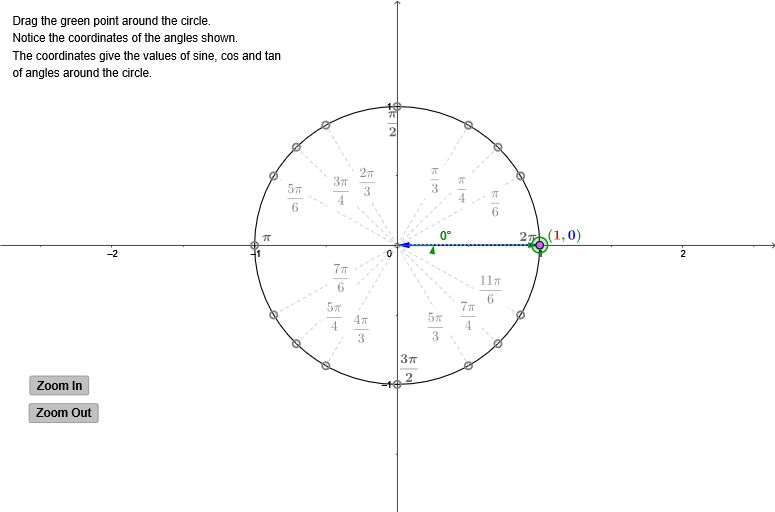
This example demonstrates the exact values of sine, cosine, and tangent on the unit circle in radians, highlighting where trigonometric values are negative in each quadrant. By dragging a point around the circle, students visualize the coordinates and understand the geometric interpretation of trigonometric functions. The construction involves key GeoGebra commands like Intersect, Point, Circle, Segment, Distance, Angle, Vector, and Polygon. It is ideal for high school trigonometry lessons to reinforce concepts of the unit circle, trigonometric ratios, and quadrant signs.
GeoGebra Commands & Parameters
Intersect(xAxis, yAxis) → OPoint(xAxis) → ECircle(O, E) → c_1Point(c_1) → XSegment(O, X) → aDistance(X, A_1) → bAngle(E, O, X) → αSegment(A_1, (x(A_1), 0)) → fSegment(A_2, (x(A_2), 0)) → gSegment(B_2, B_1) → hSegment(C_2, C_1) → iVector(O, X) → uVector(X, (x(X), 0)) → vVector(X, (0, y(X))) → wPoint(u) → ASegment(A, C_2) → eSegment(A, B_2) → jSegment(A, A_2) → kSegment(A, A_3) → lSegment(A, B_3) → mSegment(A, C_3) → nSegment(A, C_4) → pSegment(A, B_4) → qSegment(A, A_4) → rSegment(A, A_1) → s_1Segment(A, B_1) → tSegment(A, C_1) → a_1Polygon(X, (x(X), 0), A) → poly1, a_2, B, b_1Polygon((abs(x(X)), abs(y(X))), A, (abs(x(X)), 0)) → poly2, d_1, e_1, a_3Vector(C, E) → u_1Vector(X, C) → v_1
AI Drawing Prompt Reference
Draw a unit circle with the origin and a point on the x-axis defining the radius. Connect the origin to points on the circle to show sine, cosine, and tangent values, highlighting negative signs in each quadrant. Drag a point around the circle to visualize coordinates and trigonometric function relationships.
The prompt above was compiled from the original drawing commands and is for reference only.