
Exact Trig Ratios: Quiz Question Generator
Loading the math board and drawing, please wait…
In collections
Geometry Review
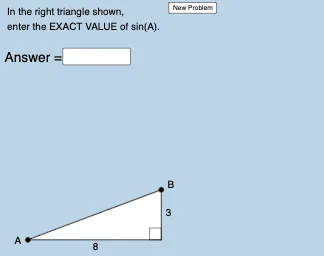
This example demonstrates how to dynamically generate triangles with special angles and calculate their exact trigonometric ratios. Core math concepts include trigonometric functions, special angles (30°, 45°, 60°), and triangle properties. Construction highlights involve commands like Random for random triangles, Polygon for creating polygons, Intersect for finding intersections, Angle for measuring angles, Textfield for displaying results, and SurdText for handling radical expressions. Suitable for high school mathematics teaching, aiding in trigonometric calculation practice and concept understanding.
GeoGebra Commands & Parameters
Random(2, 9) → aRandom(2, 10) → bRandom(a + 1, 10) → cPolygon(A, B_1, C) → t1, c_1, a_1, b_1Circle(A, c) → dIntersect(d, f, 1) → BPolygon(A, B_1, B) → t2, d_1, a_2, b_2Segment(A, B_1) → gSegment(B_1, B) → hSegment(B, A) → iSegment(C, B_1) → jSegment(C, A) → kAngle(B, B_1, A) → αRandom(1, 2) → mTextfield(e) → InputBox1Angle(B_1, A, C) → βRandom(1, 4) → nElement(L1, n) → text1Element(L2, n) → text2SurdText(e) → text8Angle(B_1, A, B) → γ
AI Drawing Prompt Reference
Create a triangle with random side lengths and draw two triangles with special angles, measure and display the degrees of the three interior angles, label the side lengths of the triangles, and use a text box to show the calculated trigonometric values and names of special angles, finally displaying the results in radical text format.
The prompt above was compiled from the original drawing commands and is for reference only.