
Euler Line Exploration
Loading the math board and drawing, please wait…
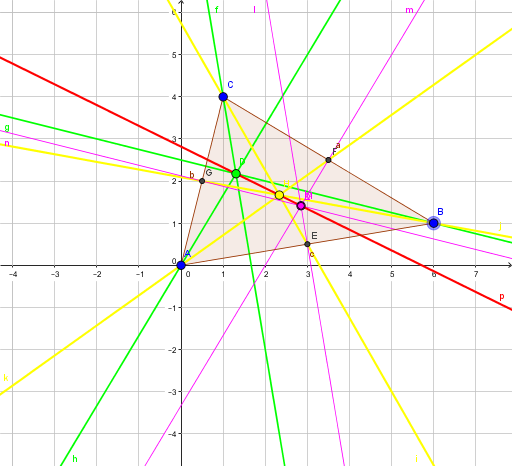
This example demonstrates the Euler line of a triangle, which is the line connecting the circumcenter, centroid, and orthocenter. Using GeoGebra commands such as Polygon, OrthogonalLine, and Intersect, the properties of the Euler line can be visually illustrated. Suitable for high school geometry learners and math enthusiasts.
GeoGebra Commands & Parameters
Polygon(A, B, C) → poly1, c, a, bOrthogonalLine(C, c) → fOrthogonalLine(B, b) → gOrthogonalLine(A, a) → hIntersect(f, g) → DMidpoint(A, B) → EMidpoint(C, B) → FMidpoint(C, A) → GLine(C, E) → iLine(B, G) → jLine(A, F) → kIntersect(i, j) → HOrthogonalLine(E, c) → lOrthogonalLine(F, a) → mOrthogonalLine(G, b) → nIntersect(l, m) → KIntersect(l, m) → LIntersect(m, n) → MLine(D, H) → p
AI Drawing Prompt Reference
Draw a triangle and its altitudes to the opposite sides, identifying the orthocenter, circumcenter, and centroid. Connect the circumcenter and centroid, then draw lines from the centroid to the midpoints of the sides, meeting at the centroid. Finally, connect the orthocenter and centroid to complete the Euler line.
The prompt above was compiled from the original drawing commands and is for reference only.