
Error Search
Loading the math board and drawing, please wait…
In collections
Binomische Formeln
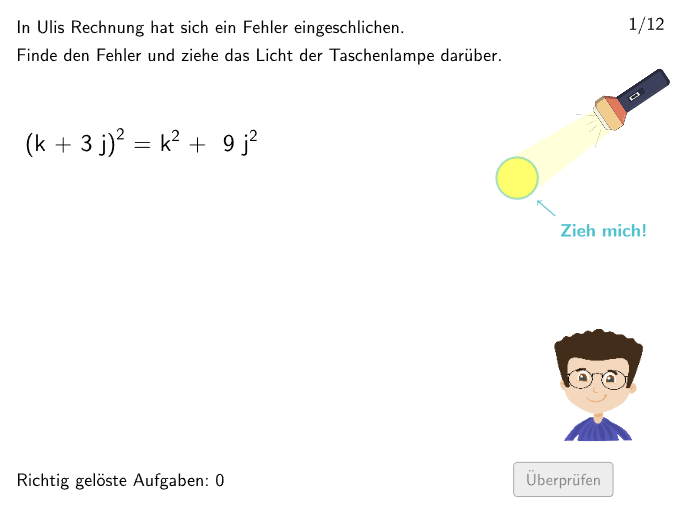
Error Search is a math exercise prepared by FLINK-Team for 7-8 grade students. Through this exercise, students can learn how to use the three binomial formulas to solve binomial expressions. The exercise uses GeoGebra to display the graph and animation of binomial expressions, helping students better understand the application of binomial formulas. GeoGebra commands: Polygon, PointIn, Point, Circle, Join, Line, Intersect, Textfield, Element, Tangent, Semicircle, LaTeX; Objects: radius, A_2, B_2, l3, l3_{2}, l3_{3}, l3_{4}, l3_{5}, Light, Origin, M7_2, k72, M7_1, k71, M1_2, M1_1, k12, k11, questionCount, M4_1, k41, correctK4, M6_1, M8_{1}, M9_{1}, k91, correctK9, M10_{1}, k101, M10_{2}, k102, correctK10, M11_1, k111, correctK11, M12_{1}, M3_1, M2_1, k21, M2_{2}. Suitable for 7-8 grade students.
GeoGebra Commands & Parameters
Polygon(A_2, (x(A_2), y(B_2)), B_2, (x(B_2), y(A_2))) → l3, l3_{2}, l3_{3}, l3_{4}, l3_{5}PointIn(l3) → LightPoint(Line[Origin, xAxis]) → M7_2Circle(M7_2, radius) → k72Point(Line[Origin, xAxis]) → M7_1Circle(M7_1, radius) → k71Point(Line[Origin, xAxis]) → M1_2Point(Line[Origin, xAxis]) → M1_1Circle(M1_2, radius) → k12Circle(M1_1, radius) → k11Point(Line[Origin, xAxis]) → M4_1Circle(M4_1, radius) → k41Point(Line[Origin, xAxis]) → M6_1Point(Line[Origin, xAxis]) → M8_{1}Point(Line[Origin, xAxis]) → M9_{1}Circle(M9_{1}, (1.93 * radius)) → k91Point(Line[Origin, xAxis]) → M10_{1}Circle(M10_{1}, radius + 0.05) → k101Point(Line[Origin, xAxis]) → M10_{2}Circle(M10_{2}, radius) → k102Point(Line[Origin, xAxis]) → M11_1Circle(M11_1, radius + 0.03) → k111Point(Line[Origin, xAxis]) → M12_{1}Point(Line[Origin, xAxis]) → M3_1Point(Line[Origin, xAxis]) → M2_1Circle(M2_1, radius + 0.04) → k21Point(Line[Origin, xAxis]) → M2_{2}Circle(M2_{2}, radius + 0.02) → k22Point(Line[Origin, xAxis]) → M5_1Point(Line[Origin, xAxis]) → M5_{2}Circle(M3_1, radius3) → k31Circle(M12_{1}, radius3) → k121Circle(M8_{1}, radius3) → k81Circle(M6_1, radius3) → k61Circle(M5_1, radius3 + 0.03) → k51Circle(M5_{2}, radius3) → k52Join(Sequence[Sequence[1, 3], m, 1, 10]) → NameNumsJoin(Sequence[Shuffle[Sequence[m, m, 1, maxExCount, 1]], k, 1, 1]) → ListeLayoutCircle(Light, radius) → pLine(Center[p], L1) → lightIntersect(Circle[L1, 1.5], light) → M3, M4Join(Sequence[Join[{Join[{{1}, Shuffle[{2, 3, 4, 5}]}], Shuffle[{6, 7, 8, 9, 10, 11, 12}]}], m, 1, 9]) → ListeExNumsTextfield(bInput) → InputBox2Element({correctK1, correctK2, correctK3, correctK4, correctK5, correctK6, correctK7, correctK8, correctK9, correctK10, correctK11, correctK12}, layout) → correctPolygon(PtopLeftCornerFeedback, PtopRightCornerFeedback, PbottomRightCornerFeedback, PbottomLeftCornerFeedback) → rectangleCorrect, ptopleftcornerfeedback, ptoprightcornerfeedback, pbottomrightcornerfeedback, pbottomleftcornerfeedbackTextfield(bInput) → Eingabefeld2Polygon(V11, (x(V11), y(V13)), V13, (x(V13), y(V11))) → v1, f, g, h, iIntersect(Circle[L1, 0.5], light) → C, DTangent(M4, p) → l1, l2Intersect(Circle[M4, 3], M4) → L_1Intersect(Circle[M4, 2], M4) → M_1Circle(M4, 1.7) → kIntersect(k, l1, 2) → N_1Intersect(k, l2) → O_1, P_1Intersect(p, l1) → Q_1Intersect(p, l2) → R_1Polygon(R_1, Q_1, N_1, P_1) → v2, r_1, q_1, n_1, p_1Circle(Light, radius) → prSemicircle(R_1, Q_1) → cLaTeX(layout, true, true) → Text16Point(Line[B1a, xAxis]) → B1bPoint(Line[B2a, xAxis]) → B2bPoint(Line[S_1, xAxis]) → T_1Point(Line[W_1, xAxis]) → Z_1Point(Line[U_1, xAxis]) → V_1
AI Drawing Prompt Reference
Set up a coordinate plane with a horizontal reference line and use the origin as the base. Place several points on that horizontal line as circle centers, then draw multiple circles with the same radius plus a few slightly adjusted radii, so that several overlapping regions appear. Construct a rectangle by defining its four corner points and keep those corner feedback points visible. Add locations for a text input box for answering, and prepare a set of selectable correct option entries. Show corresponding markers at the intersection areas formed by the circles.
The prompt above was compiled from the original drawing commands and is for reference only.