
Equilateral Triangle Construction by Steve Phelps
Loading the math board and drawing, please wait…
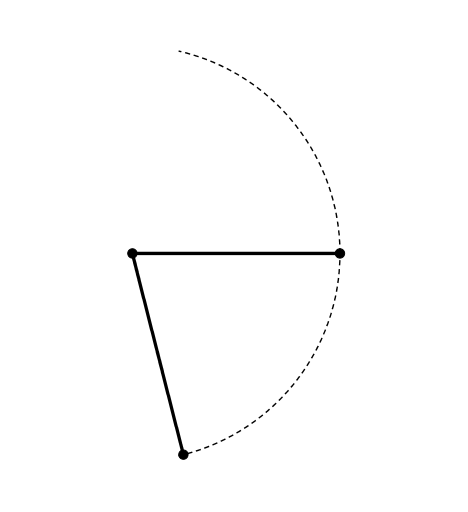
This example demonstrates how to construct an equilateral triangle using GeoGebra. Key mathematical concepts include the properties of triangles and geometric construction. Using commands like Intersect, Point, and If, an equilateral triangle can be constructed. Suitable for middle school and above students to learn about geometric construction and the properties of equilateral triangles.
GeoGebra Commands & Parameters
Intersect(xAxis, yAxis) → APoint(xAxis) → BIf(0 ≤ n < 1, Segment[A, Dilate[A, 1 - n, B]], Segment[A, B]) → fIf(2 ≤ n < 7, Rotate[f, ((3 * π / 7) * sin(((2 * π / 5) * (n - 2)))), A], f) → gIf(2 ≤ n < 7, Rotate[B, ((3 * π / 7) * sin(((2 * π / 5) * (n - 2)))), A], B) → CIf(8 ≤ n < 13, Rotate[A, ((-3 * π / 7) * sin(((2 * π / 5) * (n - 8)))), B], A) → DIf(8 ≤ n < 13, Rotate[f, ((-3 * π / 7) * sin(((2 * π / 5) * (n - 8)))), B], f) → hIf(2 ≤ n < 3.25, CircleArc[A, B, C], CircleArc[A, B, Rotate[B, ((3 * π / 7) * sin(((2 * π / 5) * (3.25 - 2)))), A]]) → cIf(4.5 ≤ n < 5.75, CircleArc[A, C, B], CircleArc[A, Rotate[B, ((-3 * π / 7) * sin(((2 * π / 5) * (5.75 - 4.5)))), A], B]) → dIf(8 ≤ n < 9.25, CircleArc[B, D, A], CircleArc[B, Rotate[A, ((-3 * π / 7) * sin(((2 * π / 5) * (9.25 - 8)))), B], A]) → eIf(10.5 ≤ n < 11.75, CircleArc[B, A, D], CircleArc[B, A, Rotate[A, ((3 * π / 7) * sin(((2 * π / 5) * (11.75 - 10.5)))), B]]) → jIntersect(c, e, 1) → EIf(14 ≤ n < 15, Segment[E, Dilate[E, 15 - n, A]], Segment[E, A]) → iIf(15 ≤ n < 16, Segment[E, Dilate[E, 16 - n, B]], Segment[E, B]) → kIf(17 ≤ n < 18, Polygon[A, E, Dilate[E, 18 - n, B], Dilate[A, 18 - n, B]], Polygon[A, E, B]) → poly1
AI Drawing Prompt Reference
On a coordinate plane, start with the origin and a point on the horizontal axis. Draw a segment between them, then rotate this segment around the origin with a varying angle to create dynamic arcs. From the intersection of two arcs, determine a third vertex, and connect it to the other two vertices to form an equilateral triangle. The figure includes the axes, a rotating segment, several circular arcs, and the final triangle, all smoothly animated by a parameter.
The prompt above was compiled from the original drawing commands and is for reference only.