
Equilateral Triangle Assessment: Side Lengths, Angles, and Vector Relations
Loading the math board and drawing, please wait…
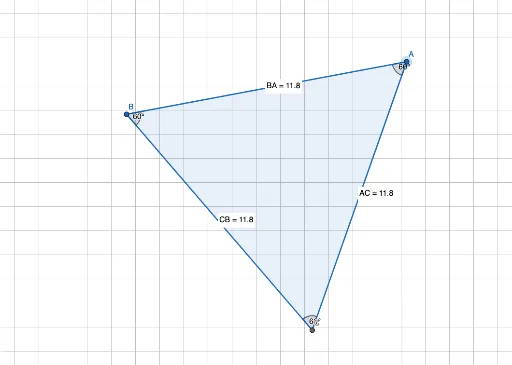
This GeoGebra example provides an interactive assessment of an equilateral triangle's properties. It demonstrates a triangle formed by vertices A, B, and C, with all three side lengths measured and all three interior angles displayed, confirming that each side is equal and each angle is 60°. The core mathematical concepts include equilateral triangle definition, congruence, two-dimensional vectors, and geometric measurement using distance and angle tools. The construction uses the Polygon command to create triangle poly1, the Distance command to compute lengths CB, BA, and AC (shown as distanceCB, TextCB, etc.), and the Angle command to generate angles α, β, γ. A Midpoint command may also be used for auxiliary constructions. This resource is suitable for middle school to high school students learning plane geometry, triangle properties, and introductory vectors, and can serve as a classroom assessment tool or for self-study to reinforce understanding of equilateral triangle symmetry and metric relationships.
GeoGebra Commands & Parameters
Polygon(A, B, 3) → poly1, f, g, h, CDistance(C, B) → distanceCBMidpoint(C, B) →Distance(B, A) → distanceBAMidpoint(B, A) →Distance(A, C) → distanceACMidpoint(A, C) →Angle(C, A, B) → αAngle(B, C, A) → βAngle(A, B, C) → γ