
Equations and Graphs: Visualizing Lines and Parabolas (IM Geo.6.8)
Loading the math board and drawing, please wait…
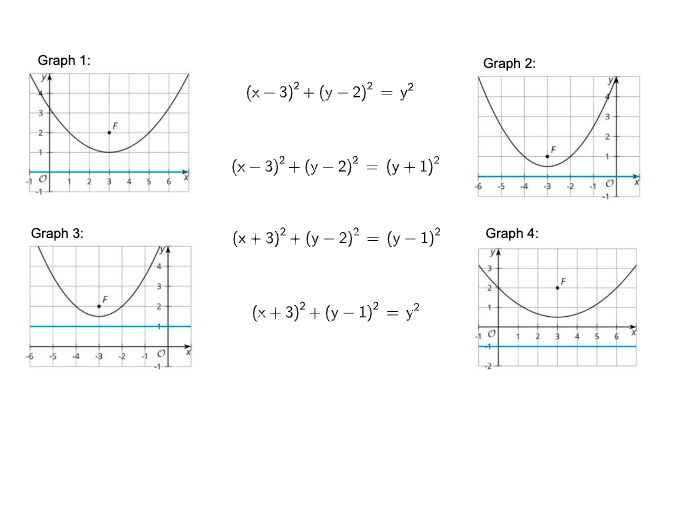
This example demonstrates how to translate algebraic equations into geometric representations, letting learners observe how graphs such as lines and parabolas appear on the same coordinate plane. Key concepts include the correspondence between linear equations and line graphs, the relationship between quadratic functions and parabolas, and the geometric meaning of equation solutions via features like points and intersections. Construction-wise, the original record does not provide a command-level construction summary; however, the scenario centers on creating and overlaying standard GeoGebra objects used for equation/graph visualization—namely linear/line-segment style elements and a parabola curve—within a coordinated graphing environment. It is well-suited for middle-school instruction (around grades 7–8) as a visual introduction to functions, strengthening intuition about solutions and graph behavior, and for classroom or self-guided exploration with GeoGebra.
AI Drawing Prompt Reference
On a single coordinate plane, draw a straight line representing a linear equation and a U-shaped parabola representing a quadratic function. The line and parabola should intersect at one or more points, which visually indicate the solutions to the system of equations. Include coordinate axes, grid lines, and clearly visible curves. Construct the graph by first drawing the axes and grid, then the line, then the parabola, and finally mark the intersection points.
The prompt above was compiled from the original drawing commands and is for reference only.