
Equal or Not Equal? Fraction Simplification and Expansion Practice
Loading the math board and drawing, please wait…
In collections
Bruchzahlen: Erweitern und Kürzen
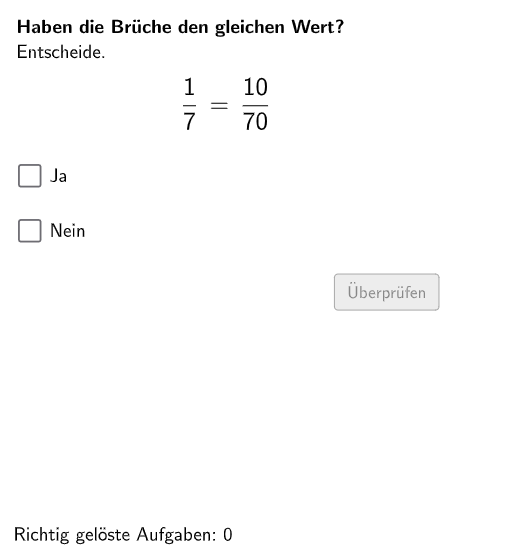
This is an interactive practice for determining fraction equality. Students are presented with two randomly generated fractions and must judge whether they are equal, then verify their answer by expanding or simplifying the fractions. The core mathematical concepts include fraction expansion (multiplying numerator and denominator by the same number) and simplification (dividing numerator and denominator by their greatest common divisor). The construction uses commands like Shuffle, Element, and If to generate random problems and validate answers, with Textfield for student input. Visual elements such as Polygon and CircleArc provide visual representations. Suitable for grades 5-6 students to develop number sense and practice fraction operations, or as an interactive teaching tool for classroom instruction.
GeoGebra Commands & Parameters
Shuffle(Sequence[Random[2, 10], i, 1, 100]) → randomNosForNennerE, {4, 7, 2, 6, 9, 3, 7, 6, 5, 8, 3, 3, 7, 3, 6, 2, 8, 9, 10, 8, 7, 10, 8, 10, 7, 10, 2, 10, 7, 2, 3, 2, 6, 7, 9, 6, 5, 5, 5, 3, 10, 9, 7, 4, 2, 4, 9, 9, 7, 8, 9, 7, 8, 6, 7, 3, 9, 10, 5, 2, 2, 3, 7, 4, 3, 3, 2, 9, 3, 6, 8, 4, 3, 2, 8, 6, 9, 3, 8, 5, 9, 2, 3, 4, 6, 8, 8, 8, 9, 3, 8, 6, 2, 5, 6, 9, 4, 10, 6, 5}Element(randomNosForNennerE, Mod[questionCount, 100] + 1) → NennerEShuffle(Sequence[Random[1, NennerE - 1], i, 1, 100]) → randomNosForZaehlerE, {2, 1, 1, 5, 6, 5, 2, 3, 6, 4, 3, 6, 2, 6, 1, 3, 6, 4, 1, 3, 6, 1, 6, 5, 1, 3, 3, 2, 5, 6, 1, 6, 3, 6, 6, 2, 6, 4, 3, 3, 4, 1, 5, 5, 4, 4, 1, 3, 6, 5, 6, 3, 4, 3, 4, 2, 5, 3, 2, 5, 6, 5, 5, 5, 6, 4, 4, 6, 1, 6, 4, 1, 3, 3, 3, 1, 3, 6, 4, 2, 3, 1, 1, 3, 2, 5, 6, 5, 4, 2, 3, 3, 4, 2, 4, 6, 1, 6, 2, 2}Element(randomNosForZaehlerE, Mod[questionCount, 100] + 1) → ZaehlerEShuffle(Sequence[Random[2, 10], i, 1, 100]) → randomNosForErweiterungsZahl, {3, 10, 8, 10, 9, 4, 10, 2, 8, 3, 6, 8, 2, 5, 3, 9, 3, 3, 6, 2, 4, 10, 8, 7, 9, 10, 2, 4, 9, 9, 8, 2, 6, 8, 6, 8, 4, 8, 2, 8, 4, 7, 6, 9, 9, 5, 9, 10, 10, 5, 5, 6, 8, 4, 4, 3, 4, 4, 7, 7, 2, 3, 7, 5, 8, 8, 5, 6, 2, 5, 2, 8, 10, 7, 5, 2, 9, 9, 5, 8, 6, 4, 9, 4, 2, 5, 3, 10, 10, 3, 7, 2, 5, 3, 10, 3, 6, 7, 9, 5}Element(randomNosForErweiterungsZahl, Mod[questionCount, 100] + 1) → ErweiterungsZahlIf(Mod[NennerE, ErweiterungsZahl] ≟ 0 ∧ Mod[ZaehlerE, ErweiterungsZahl] ≟ 0, NennerE / ErweiterungsZahl, (NennerE * ErweiterungsZahl)) → nennerSShuffle(Sequence[Random[2, 30], i, 1, 100]) → randomNosForX, {7, 15, 3, 19, 18, 16, 11, 14, 3, 5, 23, 29, 24, 5, 19, 26, 30, 30, 7, 13, 30, 7, 6, 9, 13, 4, 3, 4, 14, 22, 24, 12, 13, 17, 4, 5, 19, 8, 13, 7, 5, 7, 12, 23, 25, 9, 27, 3, 24, 3, 24, 29, 14, 16, 22, 23, 7, 4, 21, 11, 5, 28, 25, 13, 27, 4, 29, 21, 21, 8, 2, 22, 10, 25, 21, 28, 20, 25, 18, 19, 27, 20, 3, 23, 28, 22, 2, 5, 4, 7, 30, 16, 28, 21, 3, 22, 30, 25, 8, 11}Shuffle(Sequence[Random[1, 4], i, 1, 100]) → Layout, {4, 1, 3, 1, 3, 1, 1, 1, 3, 4, 3, 1, 3, 2, 4, 3, 1, 1, 2, 4, 3, 1, 4, 4, 3, 2, 2, 2, 3, 2, 4, 4, 3, 1, 4, 3, 3, 4, 1, 3, 2, 3, 2, 1, 3, 3, 1, 3, 1, 2, 2, 2, 1, 1, 3, 3, 4, 3, 1, 3, 2, 3, 3, 1, 3, 3, 1, 3, 2, 2, 4, 1, 2, 1, 2, 3, 3, 3, 4, 4, 3, 1, 2, 1, 3, 1, 4, 4, 3, 1, 3, 1, 2, 2, 1, 3, 1, 4, 4, 1}Element(Layout, Mod[questionCount, 100] + 1) → layElement(randomNosForY, Mod[questionCount, 100] + 1) → numYIf(Mod[NennerE, ErweiterungsZahl] ≟ 0 ∧ Mod[ZaehlerE, ErweiterungsZahl] ≟ 0, ZaehlerE / ErweiterungsZahl, (ZaehlerE * ErweiterungsZahl)) → zaehlerSTextfield(aInput) → InputBox1Textfield(bInput) → InputBox2Polygon(PtopLeftCornerFeedback, PtopRightCornerFeedback, PbottomRightCornerFeedback, PbottomLeftCornerFeedback) → rectangleCorrect, ptopleftcornerfeedback, ptoprightcornerfeedback, pbottomrightcornerfeedback, pbottomleftcornerfeedbackPolygon(PtopLeftCornerFeedback_{2}, PtopRightCornerFeedback_{2}, PbottomRightCornerFeedback_{2}, PbottomLeftCornerFeedback_{2}) → rectangleCorrect_{2}, ptopleftcornerfeedback_{2}, ptoprightcornerfeedback_{2}, pbottomrightcornerfeedback_{2}, pbottomleftcornerfeedback_{2}If(bruchVerschieden, B, A) → SelectedPointCorner(text6, 3) → CornerText1Segment(C, D) → fDefined(aInput) → fixed2Polygon(PtopLeftCornerFeedback_{1}, PtopRightCornerFeedback_{1}, PbottomRightCornerFeedback_{1}, PbottomLeftCornerFeedback_{1}) → rectangleCorrect_{1}, ptopleftcornerfeedback_{1}, ptoprightcornerfeedback_{1}, pbottomrightcornerfeedback_{1}, pbottomleftcornerfeedback_{1}CircleArc(E, F, G) → cCircleArc(H, I, J) → dPoint(c) → KVector(K, L) → uPoint(d) → MVector(M, N) → vCircleArc(O, P, Q) → eCircleArc(R, S, T) → gPoint(e) → UVector(U, V) → wPoint(g) → WVector(W, Z) → aCircleArc(A_1, B_1, C_1) → hCircleArc(D_1, E_1, F_1) → kPoint(h) → G_1Vector(G_1, H_1) → bPoint(k) → I_1Vector(I_1, J_1) → i
AI Drawing Prompt Reference
Create a geometry-based fraction equality practice diagram. Draw two separate rectangular regions using four corner points each: one main rectangle and a second rectangle as a comparison panel. Add paired circular arc shapes near the rectangles; on each arc define key points. From these points, draw vector arrows to indicate distinct directions for comparison. Include additional arcs with their corresponding points and connect them with further vectors so the directional cues are visually clear. Provide space for two answer input fields so a student can type their responses.
The prompt above was compiled from the original drawing commands and is for reference only.