
Ellipse with Concentric Circles
Loading the math board and drawing, please wait…
In collections
Conic Section Collection
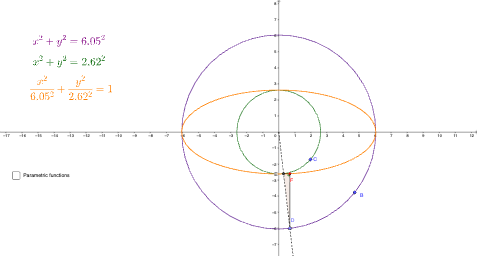
This example demonstrates the construction of an ellipse with concentric circles. The key mathematical concepts include the definition of an ellipse, circle construction, and geometric drawing techniques. The construction involves GeoGebra commands such as Circle, Point, Ray, Intersect, Segment, Locus, Polygon, Radius, and Angle. It is suitable for high school students or college undergraduates learning coordinate geometry and geometric construction skills.
GeoGebra Commands & Parameters
Circle(A, B) → cCircle(A, C) → dPoint(c) → DRay(A, D) → fIntersect(d, f, 1) → EIntersect(g, eq1) → FSegment(E, F) → hSegment(F, D) → iLocus(F, D) → loc1Polygon(E, F, D) → t1, d_1, e, f_1Radius(c) → aRadius(d) → bAngle(E, F, D) → αCircle(A_{1}, B_{1}) → c_{1}Point(c_{1}) → D_{1}Radius(c_{1}) → a_{1}Circle(A_{2}, C_{1}) → d_{2}Radius(d_{2}) → b_{1}
AI Drawing Prompt Reference
Draw a geometric construction of an ellipse with concentric circles. First, draw two circles sharing the same center. Select a point on the larger circle, then draw a ray from the center through this point, intersecting the smaller circle at another point. Connect these two intersection points to form a segment, then draw another segment from one intersection point to the moving point on the circle. Observe the locus of this point as the moving point travels around the larger circle—this traces an ellipse. Construct a triangle using the moving point and the center, and mark the corresponding angle. Finally, use the radius tool to measure the radii of both circles and label the angles.
The prompt above was compiled from the original drawing commands and is for reference only.