
Ellipse Tangent Property: Equal Angles Between Radii and Tangent
Loading the math board and drawing, please wait…
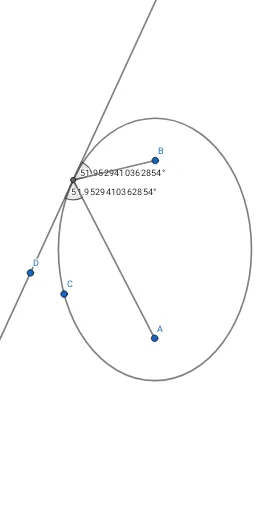
This GeoGebra example demonstrates the classic property of an ellipse: at any point on the ellipse, the two radii drawn from the foci to that point make equal angles with the tangent line at that point. The core mathematical concepts include the definition of an ellipse, tangent lines, angle equality, focal properties, and symmetry. The construction uses the Ellipse command to create the ellipse, Tangent to generate the tangent at a chosen point, Intersect to find intersection points, Segment to connect foci with the point, and Angle to measure and display the two angles. This is suitable for high school analytic geometry or college-level geometry courses, helping students visualize the optical property of ellipses (light from one focus reflects to the other) and supporting inquiry-based learning.
GeoGebra Commands & Parameters
Ellipse(A, B, C) → cTangent(D, c) → f, gIntersect(c, g) → ESegment(A, E) → hSegment(E, B) → iAngle(A, E, D) → αAngle(i, g) → β
AI Drawing Prompt Reference
Draw an ellipse with two foci. Choose a point on the ellipse and draw the tangent line at that point. Connect the point to each focus with line segments. Measure and label the two angles formed between each segment and the tangent line, showing that they are equal. Include the ellipse, foci, point, tangent, segments, and angle markers to illustrate the reflective property of the ellipse.
The prompt above was compiled from the original drawing commands and is for reference only.