
Ellipse Polar Connection
Loading the math board and drawing, please wait…
In collections
Ellipse Analysis
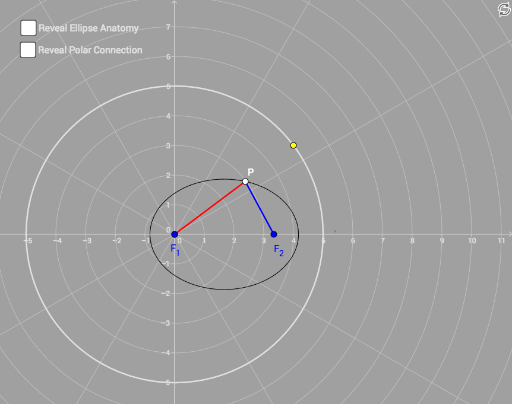
This example demonstrates the polar connection of an ellipse and its geometric properties. It involves core math concepts like ellipse, polar coordinates, similar triangles, vectors, and transformations. Construction uses commands such as Circle, Point, Line, Midpoint, OrthogonalLine, Intersect, Locus, Segment, Distance, Angle, Vector, CurveCartesian, Length. Suitable for high school students and math enthusiasts to understand analytical geometry and geometric transformations.
GeoGebra Commands & Parameters
Circle(A, B) → cPoint(c) → CLine(A, C) → fPoint(xAxis) → DLine(C, D) → gMidpoint(D, C) → EOrthogonalLine(E, g) → hIntersect(f, h) → FLine(D, F) → iLocus(F, C) → loc1Midpoint(A, D) → GOrthogonalLine(G, xAxis) → jSegment(D, F) → kLine(F, xAxis) → lSegment(A, F) → mOrthogonalLine(E_d, l) → pIntersect(l, p) → HSegment(F, H) → qDistance(D, J) → distanceDJDistance(G, J) → distanceGJDistance(G, D) → distanceGDAngle(D, A, F) → αVector(A, F) → uCircle(I, 1) → dCircle(I, 2) → rCircle(I, 3) → c_1Circle(I, 4) → d_1Circle(I, 5) → e_1Circle(I, 6) → f_1Circle(I, 7) → g_1Circle(I, 8) → h_1Circle(I, 9) → k_1Circle(I, 10) → p_1Circle(I, 11) → q_1Circle(I, 12) → r_1Circle(I, 13) → s_1Circle(I, 14) → t_1Circle(I, 15) → c_2Segment(G, K) → bSegment(G, J) → i_1Segment(R, S) → j_1Segment(D, K) → l_1Midpoint(I, D) → TIntersect(p, q) → UAngle(D, I, F) → βCurveCartesian((cos(t) * E_b^(2) / E_a / (1 - (E_c / E_a * cos(t)))), (sin(t) * E_b^(2) / E_a / (1 - (E_c / E_a * cos(t)))), t, 0, (2 * π)) → wDistance(D, p) → distanceDpIntersect(p, xAxis) → VSegment(S, W) → m_1Length(u) → a_1Distance(I, F) → distanceIFTableText({{A2, B2}, {A3, B3}, {A4, B4}, {A5, B5}, {A6, B6}, {A7, B7}, {A8, B8}, {A9, B9}, {A10, B10}, {A11, B11}, {A12, B12}, {A13, B13}}, "|_") → text1
AI Drawing Prompt Reference
Draw an ellipse and connect points on the ellipse using polar coordinates to demonstrate its geometric properties. First, draw a circle and pick a point C on it, then draw a line f through C that intersects the x-axis at D. Find the midpoint E of D and C, draw a perpendicular line h from E to f, and find the intersection F of h and f. Draw a line i through F, and use Locus(F, C) to get the locus loc1. Next, find the midpoint G of D and F, draw a perpendicular line j from G to the x-axis, draw the segment DK from D to F, draw the segment LF from F to the x-axis, draw the segment AF from A to F, draw a perpendicular line p from F, find the intersection H of p and l, draw the segment FH, calculate the distance DJ, GJ, GD, and the angle DAF as α, draw vector AF, draw circles d, r, c1, d1, e1, f1, g1, h1, k1, p1, q1, r1, s1, t1, c2, draw segments GK, GJ, RS, DK, find the midpoint T of I, find the intersection U of p and q, calculate the angle DAF as β, draw the curve w, calculate the distance Dp, and find the intersection V of p and the x-axis.
The prompt above was compiled from the original drawing commands and is for reference only.