
Ellipse: General Equation via Geometric Construction
Loading the math board and drawing, please wait…
In collections
geometriadinamica.es
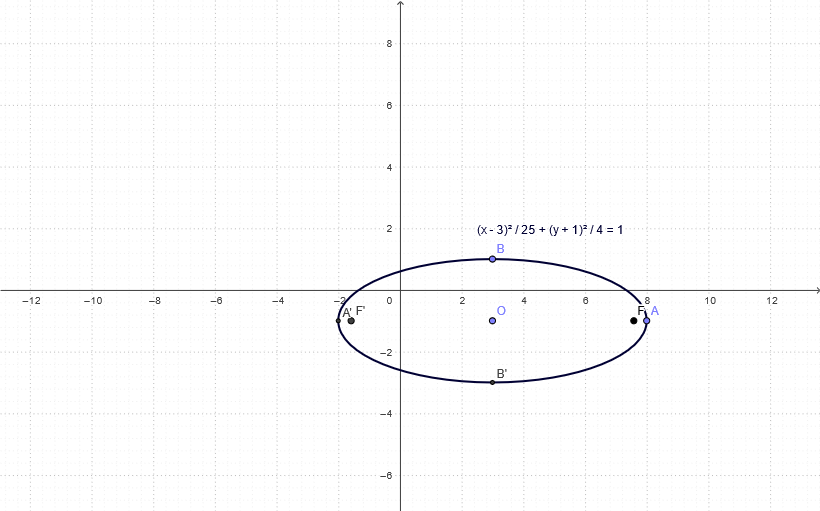
This example demonstrates how to construct an ellipse on a coordinate plane by building its key geometric elements, linking the ellipse definition to the corresponding general/standard equation behavior in a visual way. The core mathematical ideas include: ellipse properties involving foci and distance constraints, semi-axes and vertices, and using geometric construction to connect those elements to the curve’s appearance. Construction-wise, the provided GeoGebra summary indicates use of the commands “Ray, Point” to create reference geometry—defining points such as O, A, B, the endpoints of the semi-axes (semi_a, semi_b), and multiple auxiliary quantities/points (e.g., a, b, c, d, as well as derived markers like F and F', plus A' and B') that represent related focal and corresponding positions. These constructed objects (including helper constructs like AA, BB, cb, Fb, and F'b) are then used to form and display the ellipse consistent with its general equation constraints. Suitable for upper secondary through early university students studying analytic geometry and geometric construction, as well as for classroom demonstrations and self-study to visualize how equation-based properties arise from geometric definitions.
GeoGebra Commands & Parameters
Ray(O, AA) → semi_aPoint(semi_a) → ARay(O, BB) → semi_bPoint(semi_b) → B
AI Drawing Prompt Reference
Draw an ellipse with two foci, two semi-axes, and two vertices. The distance between the two foci is equal to the sum of the lengths of the two semi-axes. The two semi-axes correspond to the two vertices. Please draw the ellipse according to its definition and geometric construction, demonstrating the geometric properties and the relationship between the ellipse and its standard equation.
The prompt above was compiled from the original drawing commands and is for reference only.