
Ellipse 3D Connection
Loading the math board and drawing, please wait…
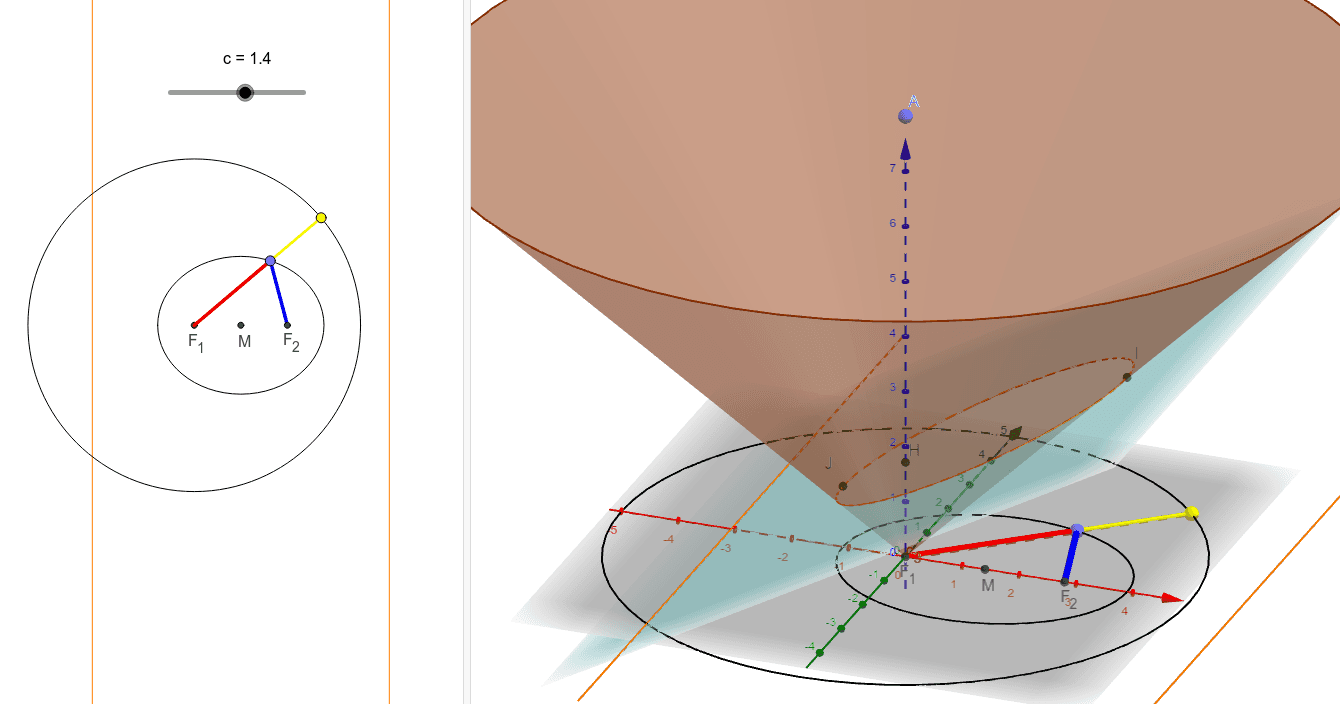
① This example demonstrates the connection between an ellipse and conic sections in 3D space, showing how an ellipse can be generated as a cross-section of a cone or cylinder. ② Core mathematical concepts include the definition of an ellipse, conic sections (quadratic curves), 3D geometric transformations, integral calculus with histograms for area approximation, vectors, and distance measurement. ③ Construction highlights: using GeoGebra commands such as Point, Intersect, IntersectPath, Cone, Corner, OrthogonalLine, Distance, Midpoint, Ellipse, Segment, Circle, Line, and Mirror to build the cone, ellipse, auxiliary lines, and symmetric objects, with text objects displaying distances (e.g., distanceJI, distanceLK). ④ Suitable for high school to undergraduate courses in analytic geometry, solid geometry, or introductory calculus, useful for visualizing the relationship between ellipses and cones, 3D geometric constructions, and integral approximations.
GeoGebra Commands & Parameters
Point(zAxis) → AIntersect(yAxis, xAxis) → BIntersectPath(d, xOyPlane) → gCone(A, B, 8) → c_1, c_2, c_3IntersectPath(d, c_1) → eCorner(e) → C, D, E, FIntersect(zAxis, e) → G,Intersect(zAxis, d) → HOrthogonalLine(H, g, space) → fIntersect(f, e) → I, JDistance(J, I) → distanceJIOrthogonalLine(I, xOyPlane) → hOrthogonalLine(J, xOyPlane) → iIntersect(h, xOyPlane) → KIntersect(i, xOyPlane) → LMidpoint(K, L) → MDistance(L, K) → distanceLKEllipse(F_2, F_1, N) → kPoint(k) → OSegment(F_2, O) → jSegment(F_1, O) → lCircle(F_1, r, xOyPlane) → pLine(F_1, O) → mIntersect(m, p) → P, QSegment(F_1, P) → nMirror(g, M) → g'
AI Drawing Prompt Reference
In 3D space, draw a cone with its apex on the z-axis and its base centered at the origin with radius 8. A plane cuts through the cone, producing an ellipse as the intersection curve. Mark the four corner points of this ellipse and find where it meets the z-axis. From a point on the ellipse, drop perpendiculars to the base plane, marking the foot points, then connect these feet to form a segment and take its midpoint. Reflect the line where the cutting plane meets the base plane about this midpoint. On the ellipse, choose a point and connect it to both foci, creating two segments. With one focus as center, draw a circle in the base plane, intersect it with the line from that focus to the ellipse point, and connect the focus to one intersection. Finally, label the distances of the two key segments.
The prompt above was compiled from the original drawing commands and is for reference only.