
Dynamic Trigonometric Ratios in a Right Triangle
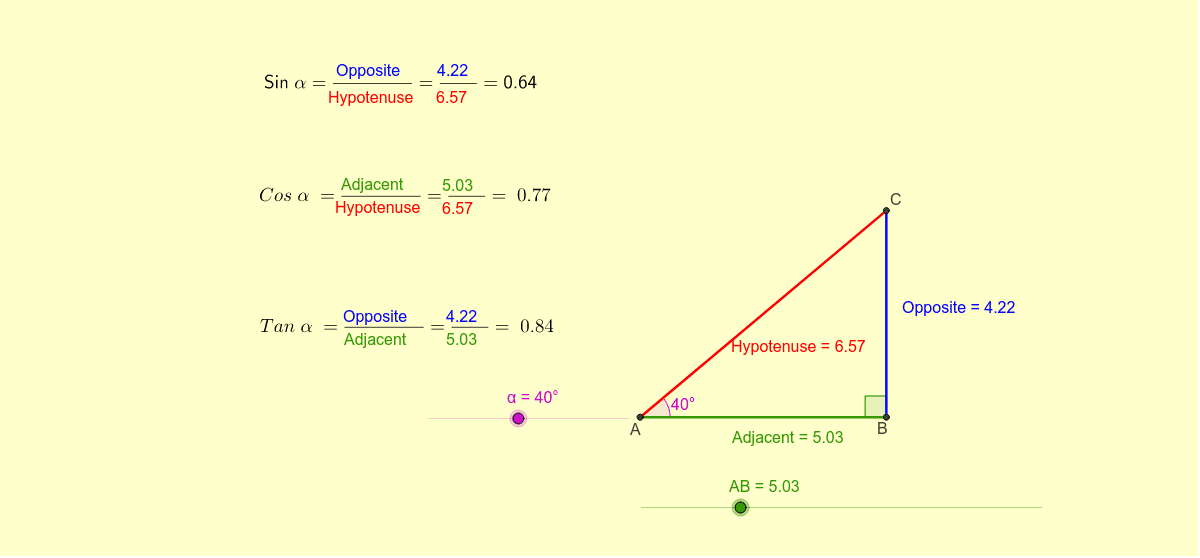
Loading the math board and drawing, please wait…
In collections
Trig Ratios
This GeoGebra example dynamically demonstrates a right triangle whose angle and side lengths can be changed, allowing students to observe how the adjacent, opposite, and hypotenuse ratios respond in real time. It covers core concepts such as sine, cosine, tangent, angle-side relationships, and the proportional meaning of trigonometric ratios in unit-circle and tangent constructions. The construction uses Intersect, Circle, Tangent, Rotate, Angle, Ray, and Segment commands to create points A, B, C, and A′, segments AB, c, b, and d, angles α, β, and γ, and labeled objects such as Adjacent, Opposite, and Hypotenuse, with multiple text objects displaying ratios and explanations. It is suitable for middle-school or high-school mathematics lessons introducing trigonometry, building geometric intuition, and supporting inquiry-based or interactive demonstrations.
GeoGebra Commands & Parameters
Intersect(xAxis, yAxis) → ACircle(A, B) → cTangent(B, c) → b,Rotate(B, α, A) → A'Angle(B, A, A') → βRay(A, A') → dIntersect(b, d) → CSegment(A, B) → AdjacentSegment(B, C) → OppositeSegment(A, C) → HypotenuseAngle(C, B, A) → γ
AI Drawing Prompt Reference
Draw a right triangle with angle A as the right angle and angle B adjustable. Construct the complementary angle β by rotating point B. Use point B and circle c to create line segment b, and then generate line segment d by rotation. The intersection of line segments b and d is point C, the third vertex of the right triangle. Connect points A, B, and C to form the three sides: adjacent, opposite, and hypotenuse, and label the corresponding angles γ.
The prompt above was compiled from the original drawing commands and is for reference only.