
Dynamic Trapezoid Construction and Properties with GeoGebra
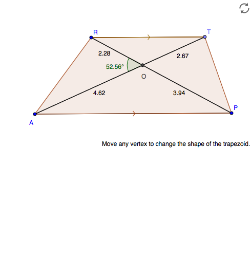
Loading the math board and drawing, please wait…
This example demonstrates how to construct a dynamic trapezoid and explore its geometric properties using GeoGebra. It uses the Polygon command to draw trapezoid ABCD, Segment to connect sides, Line to draw diagonals or auxiliary lines, Point to mark key points (such as vertices and intersection points), Intersect to find intersection coordinates, and Angle to measure interior angles or diagonal angles. Core math concepts include polygon properties (trapezoid), differences between lines and segments, angle measurement, and symmetry (isosceles trapezoid). The construction allows for dynamic manipulation by dragging vertices to observe changes in shape and analyze angle relationships and segment ratios, making it suitable for middle or high school math classes teaching geometric construction and properties.
GeoGebra Commands & Parameters
Segment(A, P) → aLine(R, a) → bPoint(b) → TSegment(R, T) → cPolygon(A, P, T, R) → poly1, a_1, b_1, d, c_1Segment(R, P) → PRSegment(T, A) → ATIntersect(PR, AT) → OSegment(R, O) → eSegment(O, P) → fSegment(O, T) → gSegment(O, A) → hAngle(R, O, A) → αSegment(R, T) → i
AI Drawing Prompt Reference
Draw a dynamic trapezoid ABCD by connecting point A to P with a segment, then draw a line through point R and segment a. Place point T on line b and connect R and T with segment c. Use the polygon command to draw trapezoid ABCD, then draw segments PR and AT, and find their intersection point O. Draw segments e, f, g, and h from point R and O, and finally measure the angle ROA.
The prompt above was compiled from the original drawing commands and is for reference only.