
Dynamic Illustration of Trapezoid Area
Loading the math board and drawing, please wait…
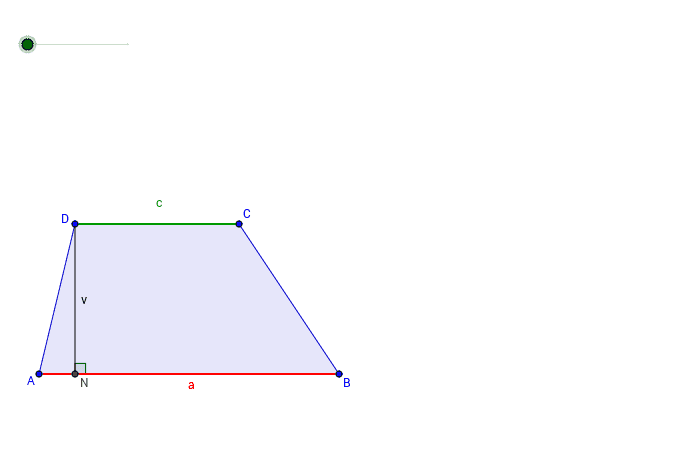
This example dynamically illustrates the relationship between the area of a trapezoid and a parallelogram. It involves core math concepts like trapezoids, parallelograms, area calculation, and the concept of limits. Construction highlights include using commands such as Line, Point, Polygon, Midpoint, Rotate, OrthogonalLine, Intersect, Angle, and Segment in GeoGebra. Suitable for high school mathematics instruction to understand the derivation of the trapezoid area formula.
GeoGebra Commands & Parameters
Line(A, xAxis) → aPoint(a) → BLine(C, a) → bPoint(b) → DPolygon(A, B, C, D) → mnogokut1, a_1, b_1, c, dMidpoint(b_1) → PRotate(A, -α, P) → A'Rotate(B, -α, P) → B'Rotate(C, -α, P) → C'Rotate(D, -α, P) → D'Polygon(A', B', C', D') → mnogokut1', a', b', c', d'OrthogonalLine(D, a) → eIntersect(a, e) → NAngle(e, a) → βSegment(D, N) → fSegment(N, A) → gSegment(A, C) → hSegment(B, D) → iIntersect(h, i) → ESegment(C, D') → jSegment(B, A') → kIntersect(j, k) → F
AI Drawing Prompt Reference
Draw a trapezoid ABCD, then rotate it around point P to form trapezoid A'B'C'D'. Next, draw a perpendicular line from D to AB, intersecting at point N, and measure the angle β between lines e and a. Finally, connect relevant points to form segments f, g, h, i, j, and k, and find their intersection points E and F.
The prompt above was compiled from the original drawing commands and is for reference only.