
Dynamic Exploration of SSA Congruence
Loading the math board and drawing, please wait…
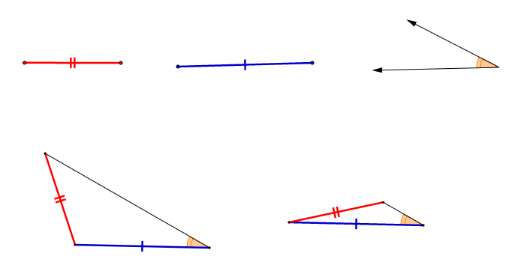
This GeoGebra example dynamically demonstrates the ambiguity of the Side-Side-Angle (SSA) condition for triangle congruence. Given two sides and a non-included angle, the construction can yield two distinct triangles, showing why SSA is not a valid congruence criterion. Core mathematical concepts include triangle congruence, the sine rule, geometric construction, and the behavior of intersection points in dynamic geometry. The construction uses GeoGebra tools such as Segment, Circle, Point, Intersect, Line, and Angle to create fixed segments AB and AC, draw a circle centered at C with radius AC, and intersect it with a ray from B to obtain two possible points D and E, forming two triangles with corresponding angles labeled α. This resource is suitable for high school geometry classes to clarify congruence conditions, and also for undergraduate geometry or mathematics education discussions to emphasize the rigor of geometric propositions.
GeoGebra Commands & Parameters
Segment(A, B) → fSegment(C, D) → gVector(E, F) → uVector(E, G) → vCircle(H, Segment[C, D]) → cPoint(c) → ISegment(H, I) → hCircle(I, Segment[G, E]) → dCircle(I, Segment[E, F]) → eIntersect(d, h, 1) → JCircle(J, Segment[G, F]) → kIntersect(e, k, 2) → KLine(I, K) → iCircle(H, Segment[B, A]) → pIntersect(p, i, 2) → LSegment(H, L) → jSegment(L, I) → lCircle(M, Segment[D, C]) → qPoint(q) → NSegment(M, N) → mCircle(N, Segment[G, E]) → rCircle(N, Segment[F, E]) → sIntersect(r, m, 1) → OCircle(O, Segment[G, F]) → tIntersect(s, t, 2) → PLine(N, P) → nCircle(M, Segment[B, A]) → c_1Intersect(c_1, n, 1) → QSegment(M, Q) → aSegment(N, Q) → bAngle(L, I, H) → αAngle(Q, N, M) → βAngle(G, E, F) → γ