
Dynamic Demonstration of Triangle Area Formula 1/2(bh)
Loading the math board and drawing, please wait…
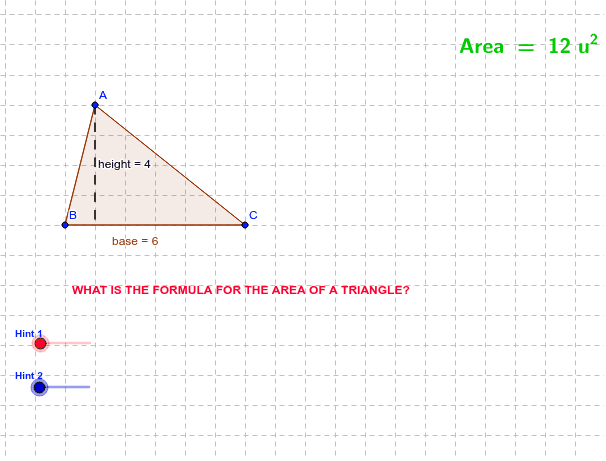
This GeoGebra applet demonstrates one geometric reason why the area of a triangle is given by the formula 1/2·bh, dynamically showing how base length and corresponding height jointly determine triangular area. Core mathematical concepts include triangle area, base, height, congruent figures, translation, rotation, midpoint, orthogonal lines, and segment intersection in plane geometry. The construction employs GeoGebra commands such as Polygon, Midpoint, Rotate, OrthogonalLine, Intersect, If, Line, and Segment, involving objects like points A, B, C, P, D, E, F, H and segments base, b, height, along with transformed copies. Suitable for middle school and early high school geometry instruction, classroom demonstrations, and self-paced exploration of area formula derivations.
GeoGebra Commands & Parameters
Polygon(A, B, C) → P, c, base, bMidpoint(A, C) → DRotate(A, -1.0 * α, D) → A'Rotate(B, -1.0 * α, D) → B'Rotate(C, -1.0 * α, D) → C'Polygon(A', B', C') → P', c', a', b'OrthogonalLine(A, base) → dIntersect(base, d) → EIf(α > 179.0 * °, F) → ZIf(a ≟ 1.0, G) → YLine(B, C) → eOrthogonalLine(A, e) → fIntersect(e, f) → HSegment(A, H) → height
AI Drawing Prompt Reference
Draw a triangle and demonstrate that its area equals half the base times the height. Start with an arbitrary triangle, choose one side as the base, and drop a perpendicular from the opposite vertex to the base to obtain the height. Rotate the entire triangle around the midpoint of the base by a certain angle to create a congruent rotated triangle, so that the two triangles together form a parallelogram, visually showing the original triangle is half the parallelogram. Also draw the altitude to another side and mark the foot. Connect the vertex to the foot with a segment to emphasize the height. Dynamically show how the area formula works as base and height change.
The prompt above was compiled from the original drawing commands and is for reference only.