
Dynamic construction with intersections, segments, and rays (dem1)
Loading the math board and drawing, please wait…
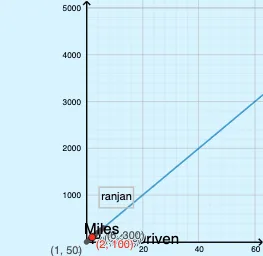
This example demonstrates how to build a dynamic plane geometry configuration by using segments, rays, and their intersection points, while controlling key parameters with sliders. It is designed to help learners observe how constructed geometric quantities change as inputs vary. The involved mathematics concepts include intersection-based geometric construction (Intersect), relationships formed by Segment and Ray, and an instructional bridge to broader themes highlighted by the source tags such as confidence intervals and frequency/distribution thinking. Construction details: the provided GeoGebra command summary indicates the use of Intersect, Segment, and Ray, together with objects including yslider and xslider (parameter sliders), points such as G, A, B, C, D, E, F, and additional labeled points (H, I, J, K, L) plus elements like pic1 and multiple text objects (text1–text8). These components support both the geometry creation and the accompanying annotations for an interactive visualization. Suitable for secondary education geometry construction lessons and dynamic-geometry demonstrations, and can also serve as an intuitive entry point for discussions connecting geometry intuition to statistical ideas.
GeoGebra Commands & Parameters
Intersect(xAxis, yAxis) → ASegment(A, B) → fRay((0, 0), G) → g
AI Drawing Prompt Reference
Draw a dynamic plane geometry configuration with x and y axes intersecting at a point, a line segment drawn through the intersection, and a ray starting from the origin and ending at a dynamic point, with a slider controlling the position of the dynamic point to show how geometric quantities change with varying inputs.
The prompt above was compiled from the original drawing commands and is for reference only.