
Dynamic Construction of Similar Triangles with Symmetry
Loading the math board and drawing, please wait…
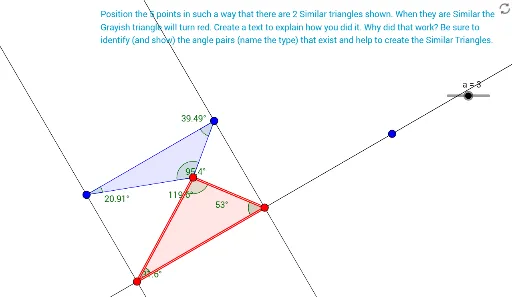
This GeoGebra example demonstrates the construction of a set of similar triangles, enriched with sine, equilateral triangles, and symmetry elements, to visually explore the properties of similarity under geometric transformations. The core mathematical concepts include criteria and properties of similar triangles, the sine rule, symmetry of equilateral triangles, and transformations such as reflection and dilation. The construction uses commands like Polygon to create triangles, OrthogonalLine for perpendiculars, Line and Intersect to define intersections, Mirror for reflection, Ray and Segment for drawing, Dilate for scaling, and Point and Angle to mark key elements. Multiple triangles (poly1, poly2) and auxiliary lines (h_1, f_1, g_1) are involved, with symmetric points (G', H') and a dilation center (Z) generating similar figures. This example is suitable for middle and high school geometry classes, helping students understand dynamic similarity, symmetry, and the integrated use of geometric construction tools. It also serves as a resource for mathematical experiments and inquiry-based learning.
GeoGebra Commands & Parameters
Polygon(F, G, H) → poly2, h_1, f_1, g_1OrthogonalLine(H, f_1) → m_2Line(C_1, f_1) → n_2Intersect(m_2, n_2) → D_1OrthogonalLine(G, f_1) → l_2Intersect(l_2, n_2) → E_1Line(A, B) → b_1Polygon(C, A, B) → poly1, b, c, a_2Line(Z, a_2) → k_2Intersect(b_1, k_2) → A_1Line(A, C) → t_1Intersect(t_1, k_2) → B_1Mirror(G, F) → G'Ray(F, G') → lRay(A, B) → fRay(A, C) → gSegment(D, A) → hSegment(E, A) → iSegment(D, E) → jMirror(H, F) → H'Ray(F, H') → kSegment(I, F) → mSegment(F, J) → nSegment(J, I) → pPolygon(A, D, E) → poly3, e, a_1, dPolygon(F, J, I) → poly4, i_1, f_2, j_1Polygon(K, L, M) → poly5, m_1, k_1, l_1Dilate(M, o, M) → M'Dilate(K, o, Scale) → K'Dilate(L, o, Scale) → L'Dilate(M, o, Scale) → M'_1Polygon(K', L', M'_1) → poly5', m'_1, k', l'Segment(O, P) → qSegment(O, Q) → rSegment(P, Q) → sDilate(O, 1 / 3, Q) → O'Line(O', s) → tIntersect(q, t) → RSegment(R, O') → n_1Segment(O, O') → p_1Segment(O', Q) → q_1Segment(R, P) → r_1Segment(R, O) → s_1Line(F, p) → c_1Line(G, m) → d_1Intersect(d_1, c_1) → SSegment(T, U) → e_1OrthogonalLine(T, e_1) → g_2Point(g_2) → VSegment(V, T) → h_2Segment(V, U) → i_2OrthogonalLine(T, i_2) → j_2Intersect(j_2, i_2) → WAngle(V, T, W) → αAngle(W, T, U) → βAngle(T, U, W) → γAngle(T, V, W) → δAngle(V, W, T) → εAngle(T, W, U) → ζAngle(A_1, E, A) → ηAngle(A_1, A, B_1) → θAngle(A, B_1, A_1) → ιAngle(A, A_1, B_1) → κAngle(A, B, C) → λAngle(A, C, B) → μAngle(F, I, J) → νAngle(I, J, F) → ξAngle(poly4) → ο, ρ, σAngle(poly2) → τ, υ, ϕ
AI Drawing Prompt Reference
Draw a geometric figure with several similar triangles. Start with an arbitrary triangle, then construct another triangle on one of its sides using perpendiculars and extended lines to make it similar. Reflect one triangle across a point to create a mirrored copy, and draw rays and segments from the reflection. Then dilate another triangle about a center point to produce a smaller similar triangle. Finally, add auxiliary segments and perpendiculars, marking key intersections to show similarity, symmetry, and scaling transformations.
The prompt above was compiled from the original drawing commands and is for reference only.