
Duplicating Line Segment
Loading the math board and drawing, please wait…
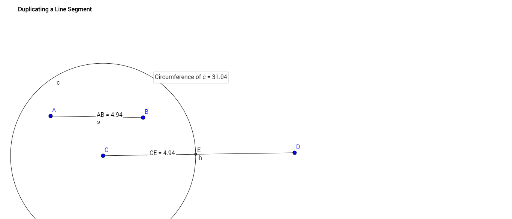
This example demonstrates how to duplicate a line segment. Key mathematical concepts include line segments, rotation, and similarity transformations. Using GeoGebra commands such as Segment, Circle, Intersect, Distance, etc., the construction of a duplicated line segment is shown. Suitable for middle and high school students learning geometric constructions.
GeoGebra Commands & Parameters
Segment(A, B) → gSegment(C, D) → hCircle(C, Segment[B, A]) → cIntersect(c, h, 1) → EDistance(A, B) → distanceABMidpoint(A, B) →Distance(C, E) → distanceCEMidpoint(C, E) →Circumference(c) → circumferencecPointIn(c) → Pointc
AI Drawing Prompt Reference
Draw a line segment, then draw another line segment whose length equals the first. Start by defining two points and connecting them to form the first segment. Then define two more points and connect them to form the second segment. Using one endpoint of the second segment as the center, draw a circle with radius equal to the length of the first segment. This circle intersects the second segment at a point. Mark this intersection point, and measure the length of the first segment as well as the distance from the center to the intersection point to verify they are equal. Also, find the midpoint of the first segment and the midpoint of the segment from the center to the intersection point. Finally, draw the circumference of the circle and place a random point inside it.
The prompt above was compiled from the original drawing commands and is for reference only.