
Drawing a Hyperbola
Loading the math board and drawing, please wait…
In collections
Exploring Conic Sections
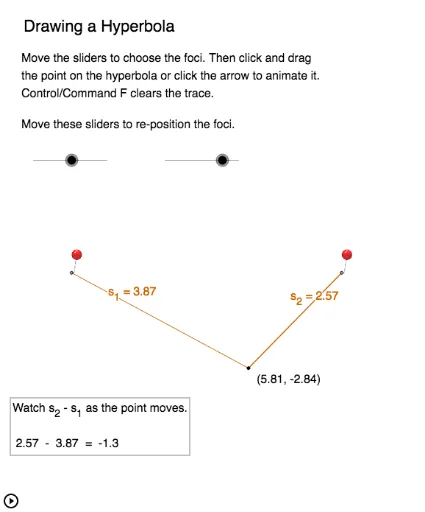
This applet demonstrates how a hyperbola is constructed. It involves key concepts of hyperbolas and uses GeoGebra commands such as Circle, Line, Intersect, Rotate, Tangent, and Hyperbola. Suitable for high school mathematics, particularly for learning coordinate geometry and function graphs.
GeoGebra Commands & Parameters
Circle(A_2, w) → cCircle(A_2, h) → dLine(A_2, xAxis) → eIntersect(c, e, 2) → B_2Rotate(B_2, α, A_2) → BTangent(B, c) → f,Line(B, A_2) → gIntersect(c, g, 2) → ATangent(A, c) → h_2,Circle(A, h) → kCircle(A, Radius[c]) → pCircle(B, Radius[d]) → qCircle(A, w) → rCircle(B, h) → sIntersect(r, s, 1) → IHyperbola(A, B, I) → tPoint(t) → DIntersect(t, e, 2) → EOrthogonalLine(E, e) → iIntersect(t, e, 1) → FOrthogonalLine(F, e) → jDistance(E, F) → distanceEFCircle(A_2, Segment[A_2, B]) → c_1Intersect(c_1, j, 1) → GOrthogonalLine(G, j) → lIntersect(c_1, j, 2) → HOrthogonalLine(H, j) → mIntersect(c_1, i, 1) → JIntersect(c_1, i, 2) → KPolygon(H, G, J, K) → poly1, h_1, g_1, j_1, k_1Line(J, H) → nLine(G, K) → a_1Segment(D, A) → s_1Segment(D, B) → s_2Segment(A_2, F) → aDistance(E, F) → a_2OrthogonalLine(A_2, a) → b_2Intersect(g_1, b_2) → LSegment(A_2, L) → bCircle(A_1, g_2) → h_3Circle(B_1, e_1) → k_2Intersect(h_3, k_2, 1) → C_1Ellipse(A_1, B_1, C_1) → p_1Line(A_1, B_1) → i_1Point(p_1) → B'_1Segment(A_1, B'_1) → j_2Segment(B_1, B'_1) → l_1Segment(A_1, B_1) → a_3Midpoint(a_3) → G_1OrthogonalLine(G_1, a_3) → b_3Intersect(p_1, b_3) → F_1, E_1Line(A_1, B_1) → c_2Intersect(p_1, c_2) → C_2, D_1Distance(G_1, D_1) → distanceGD_1Distance(G_1, E_1) → distanceGE_1Segment(G_1, E_1) → b_4Segment(G_1, D_1) → a_4
AI Drawing Prompt Reference
Draw a hyperbola to demonstrate its construction. Start by creating two circles, then draw a line intersecting one circle to get a point. Rotate this point around the circle's center, connect the rotated point to the center, and draw the tangent at this point. Find the other intersection of the tangent with the circle, and use this point to draw a new circle. Finally, construct the hyperbola using these points and lines, clearly showing the formation process, and label key points and auxiliary lines.
The prompt above was compiled from the original drawing commands and is for reference only.