
Draw Lines of Symmetry: Exploring Mirror Symmetry in Polygons
Loading the math board and drawing, please wait…
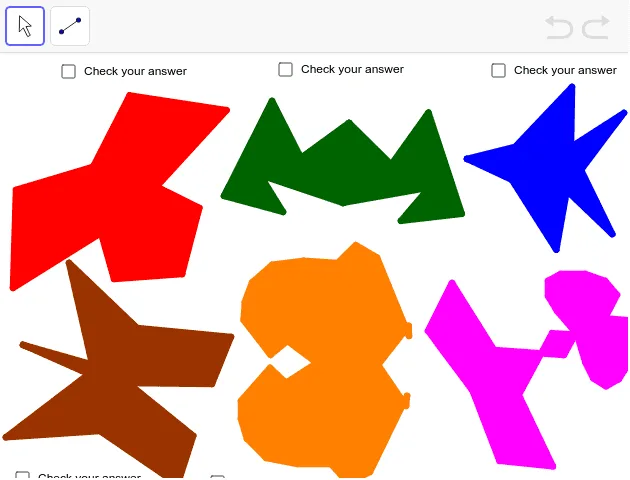
① This GeoGebra example dynamically demonstrates how to draw lines of symmetry for multiple polygons, visually showing that a figure coincides with its mirror image when reflected across a line. ② The core mathematical concept is axial (mirror) symmetry, involving the definition of symmetry axes, reflection of polygon vertices across a line, and properties of symmetric figures. ③ Construction highlights: uses the Polygon command to create several polygons (poly1, poly2, poly3), the Mirror command to generate reflected polygons, and the Segment command to draw symmetry axes (segments a through r), while constructing corresponding points (A through S) to aid observation. ④ Suitable for middle school geometry lessons, this tool helps teach the concept of line symmetry, how to identify symmetry axes, and serves as an interactive exploration for students to understand the geometric meaning of reflection transformations.
GeoGebra Commands & Parameters
Polygon(A, B, C, D, E, F) → poly1, a, b, c, d, e, fPolygon(G, H, I, J, K, L, M) → poly2, g, h, i, j, k, l, mPolygon(N, O, P, Q, R, S) → poly3, n, o, p, q, r, sPolygon(T, U, V, W, Z, A_1, B_1) → poly4, t, u, v, w, z, a_1, b_1Polygon(C_1, E_1, O_1, P_1, Q_1, R_1, F_1, H_1, I_1, J_1, K_1, L_1, M_1, N_1) → poly5, c_1, n_1, o_1, p_1, q_1, r_1, e_1, f_1, h_1, i_1, j_1, k_1, l_1, m_1Polygon(G_1, S_1, E_2, F_2, G_2, H_2, I_2, J_2, T_1, U_1, V_1, W_1, Z_1, B_2, C_2, D_2) → poly6, g_1, d_2, e_2, f_2, g_2, h_2, i_2, j_2, s_1, t_1, u_1, v_1, w_1, z_1, b_2, c_2Mirror(A, f) → A'Mirror(B, f) → B'Mirror(C, f) → C'Mirror(D, f) → D'Mirror(E, f) → E'Mirror(F, f) → F'Polygon(A', B', C', D', E', F') → poly1', a', b', c', d', e', f'Mirror(G, k) → G'Mirror(H, k) → H'Mirror(I, k) → I'Mirror(J, k) → J'Mirror(K, k) → K'Mirror(L, k) → L'Mirror(M, k) → M'Polygon(G', H', I', J', K', L', M') → poly2', g', h', i', j', k', l', m'Mirror(N, n) → N'Mirror(O, n) → O'Mirror(P, n) → P'Mirror(Q, n) → Q'Mirror(R, n) → R'Mirror(S, n) → S'Polygon(N', O', P', Q', R', S') → poly3', n', o', p', q', r', s'Mirror(T, v) → T'Mirror(U, v) → U'Mirror(V, v) → V'Mirror(W, v) → W'Mirror(Z, v) → Z'Mirror(A_1, v) → A_2Mirror(B_1, v) → K_2Polygon(T', U', V', W', Z', A_2, K_2) → poly4', t', u', v', w', z', a_2, k_2Mirror(C_1, r_1) → L_2Mirror(E_1, r_1) → M_2Mirror(F_1, r_1) → N_2Mirror(H_1, r_1) → O_2Mirror(I_1, r_1) → P_2Mirror(J_1, r_1) → Q_2Mirror(K_1, r_1) → R_2Mirror(L_1, r_1) → S_2Mirror(M_1, r_1) → T_2Mirror(N_1, r_1) → U_2Mirror(O_1, r_1) → V_2Mirror(P_1, r_1) → W_2Mirror(Q_1, r_1) → Z_2Mirror(R_1, r_1) → A_3Polygon(L_2, M_2, V_2, W_2, Z_2, A_3, N_2, O_2, P_2, Q_2, R_2, S_2, T_2, U_2) → poly5', l_2, u_2, v_2, w_2, z_2, a_3, m_2, n_2, o_2, p_2, q_2, r_2, s_2, t_2Mirror(G_1, h_2) → B_3Mirror(S_1, h_2) → C_3Mirror(T_1, h_2) → D_3Mirror(U_1, h_2) → E_3Mirror(V_1, h_2) → F_3Mirror(W_1, h_2) → G_3Mirror(Z_1, h_2) → H_3Mirror(B_2, h_2) → I_3Mirror(C_2, h_2) → J_3Mirror(D_2, h_2) → K_3Mirror(E_2, h_2) → L_3Mirror(F_2, h_2) → M_3Mirror(G_2, h_2) → N_3Mirror(H_2, h_2) → O_3Mirror(I_2, h_2) → P_3Mirror(J_2, h_2) → Q_3Polygon(B_3, C_3, L_3, M_3, N_3, O_3, P_3, Q_3, D_3, E_3, F_3, G_3, H_3, I_3, J_3, K_3) → poly6', b_3, k_3, l_3, m_3, n_3, o_3, p_3, q_3, c_3, d_3, e_3, f_3, g_3, h_3, i_3, j_3Segment(R_3, S_3) → d_1Segment(T_3, U_3) → r_3Segment(V_3, W_3) → s_3Segment(Z_3, A_4) → t_3Segment(B_4, D_1) → a_4Segment(C_4, D_4) → b_4
AI Drawing Prompt Reference
Draw several polygons and their corresponding symmetry axes, showing how reflecting the vertices of each polygon across its axis creates a mirror image that coincides with the original, to illustrate axial symmetry and help understand the concept of reflection transformations and symmetry axes identification.
The prompt above was compiled from the original drawing commands and is for reference only.