
Double Bracket Expansion
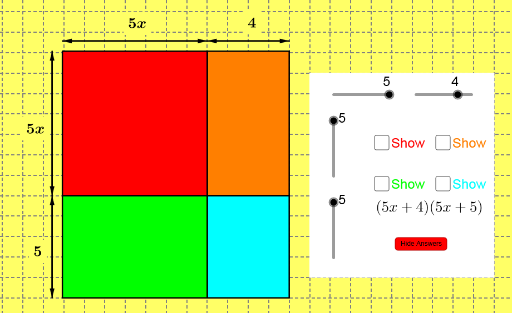
Loading the math board and drawing, please wait…
This example demonstrates the geometric construction and properties of a regular triangle and a pyramid. It involves core mathematical concepts such as regular polygons, midpoints, vector operations, and solid geometry. The construction uses commands like Polygon, Midpoint, and Vector to create shapes and vectors. Suitable for high school students studying solid geometry and vectors, it helps in understanding the construction and properties of spatial figures.
GeoGebra Commands & Parameters
Polygon(F, I, E, H) → poly1, f, i, e, hPolygon(I, D, A, E) → poly2, i_1, d_1, a_1, e_1Polygon(H, E, B, C) → poly3, h_1, e_2, b_1, c_1Polygon(E, A, G, B) → poly4, e_3, a_2, g, b_2Midpoint(F, E) → JMidpoint(D, E) → KMidpoint(E, G) → LMidpoint(H, B) → MVector(P, O) → uVector(O, P) → vVector(O, N) → wVector(N, O) → zVector(Q, R) → jVector(R, Q) → kVector(R, S) → lVector(S, R) → mMidpoint(P, O) → TMidpoint(O, N) → UMidpoint(Q, R) → VMidpoint(R, S) → WPolygon(Z, A_1, B_1, C_1) → poly5, z_1, a_3, b_3, c_2
AI Drawing Prompt Reference
Draw a geometric construction of a regular triangle and a pyramid, showcasing regular polygons, midpoints, and vector operations. Start by constructing a regular triangle, then build a pyramid on its base, marking the midpoints of each side and using vectors to represent relationships between key points. Begin with the base triangle and progressively add the sides to complete the pyramid, highlighting the application of spatial geometry and vectors.
The prompt above was compiled from the original drawing commands and is for reference only.