
Divisibility Rules for 4 and 25
Loading the math board and drawing, please wait…
In collections
Teilbarkeitsregeln
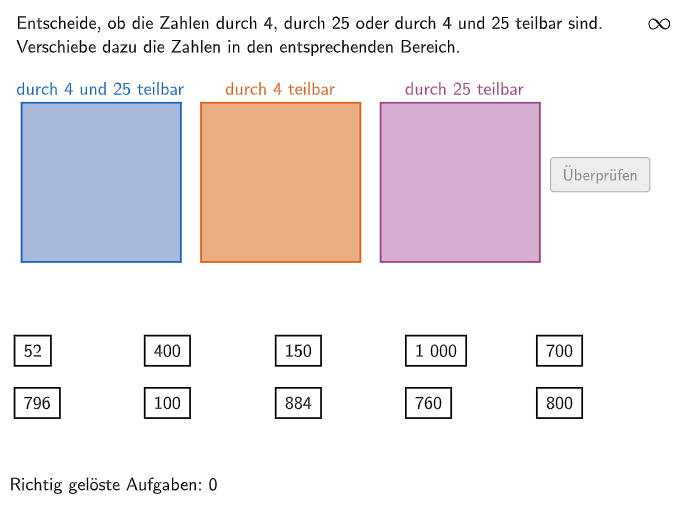
This interactive GeoGebra example helps students master the divisibility rules for 4 and 25 through practical exercises. Key mathematical concepts include: definition of divisibility, rule for 4 (last two digits), rule for 25 (last two digits). Construction details: Textfield for user input, Element and If for answer checking, Shuffle and RandomList for generating random questions, ColorText for feedback. Three difficulty levels (Q1-Q3) test understanding, application, and flexible use of rules. Suitable for grades 5-6 students learning number sense and factors/multiples.
GeoGebra Commands & Parameters
Polygon(Q1E1, Q1E2, 4) → Q1, q1_1, q1_2, q1_3, q1_4, Q1E3, Q1E4Polygon(Q2E1, Q2E2, 4) → Q2, q2_1, q2_2, q2_3, q2_4, Q2E3, Q2E4Polygon(Q3E1, Q3E2, 4) → Q3, q3_4, q3_1, q3_2, q3_3, Q3E3, Q3E4Shuffle(Sequence[Element[Shuffle[Sequence[(k * 4), k, 1, 250]], i], i, 1, 5]) → RandomList4, {884, 796, 760, 52, 884}Shuffle(Sequence[Element[Shuffle[Sequence[(k * 25), k, 1, 40]], i], i, 1, 5]) → RandomList25, {1000, 100, 150, 1000, 700}Shuffle(Sequence[Element[Shuffle[Sequence[(k * 100), k, 1, 10]], i], i, 1, 5]) → RandomList100, {1000, 800, 800, 100, 400}Shuffle(Unique[Join[{RandomList4, RandomList25, RandomList100}]]) → RandomListNum, {52, 400, 150, 1000, 700, 796, 100, 884, 760, 800}Midpoint(Corner[NumText7, 1], Corner[NumText7, 3]) → Pos7Midpoint(Corner[NumText10, 1], Corner[NumText10, 3]) → Pos10Midpoint(Corner[T1830, 1], Corner[T1830, 3]) → Pos1830Midpoint(Corner[NumText6, 1], Corner[NumText6, 3]) → Pos6Midpoint(Corner[NumText3, 1], Corner[NumText3, 3]) → Pos3Midpoint(Corner[T1826, 1], Corner[T1826, 3]) → Pos1826Midpoint(Corner[NumText5, 1], Corner[NumText5, 3]) → Pos5Midpoint(Corner[NumText9, 1], Corner[NumText9, 3]) → Pos9Midpoint(Corner[T2628, 1], Corner[T2628, 3]) → Pos2628Midpoint(Corner[NumText8, 1], Corner[NumText8, 3]) → Pos8Midpoint(Corner[NumText4, 1], Corner[NumText4, 3]) → Pos4Midpoint(Corner[NumText2, 1], Corner[NumText2, 3]) → Pos2Midpoint(Corner[NumText1, 1], Corner[NumText1, 3]) → Pos1Textfield(aInput) → InputBox1Textfield(bInput) → InputBox2Polygon(PtopLeftCornerFeedback, PtopRightCornerFeedback, PbottomRightCornerFeedback, PbottomLeftCornerFeedback) → rectangleCorrect, ptopleftcornerfeedback, ptoprightcornerfeedback, pbottomrightcornerfeedback, pbottomleftcornerfeedbackShuffle(Sequence[Random[0, 10], i, 1, 100]) → randomNosForX, {1, 3, 5, 5, 0, 10, 9, 0, 9, 8, 2, 8, 6, 10, 10, 1, 3, 6, 9, 10, 4, 2, 0, 9, 2, 10, 6, 3, 6, 3, 9, 6, 5, 3, 5, 3, 0, 5, 7, 4, 0, 3, 9, 0, 9, 10, 0, 9, 8, 6, 4, 9, 10, 7, 8, 1, 3, 7, 2, 5, 2, 0, 6, 0, 10, 9, 6, 10, 8, 2, 8, 0, 7, 10, 4, 10, 9, 4, 9, 8, 0, 3, 0, 10, 6, 6, 9, 3, 10, 0, 10, 1, 3, 6, 7, 7, 2, 6, 9, 8}Element(randomNosForX, Mod[questionCount, 100] + 1) → numXShuffle(Sequence[Random[0, 10], i, 1, 100]) → randomNosForY, {9, 9, 1, 8, 9, 1, 7, 8, 7, 6, 10, 8, 8, 2, 4, 3, 0, 6, 10, 7, 6, 6, 8, 5, 2, 4, 4, 8, 2, 10, 6, 0, 1, 7, 0, 5, 3, 2, 7, 7, 2, 9, 6, 4, 0, 10, 3, 4, 6, 7, 9, 9, 0, 4, 6, 2, 2, 8, 4, 5, 10, 2, 5, 1, 7, 2, 8, 6, 3, 5, 0, 3, 3, 3, 8, 2, 3, 6, 9, 8, 5, 1, 3, 7, 1, 3, 6, 6, 4, 9, 7, 2, 2, 3, 4, 10, 1, 6, 6, 6}Element(randomNosForY, Mod[questionCount, 100] + 1) → numYAppend(true, Sequence[If[randomNosForX(i) ≟ randomNosForX(i - 1), false, true], i, 2, 100]) → stayXAppend(true, Sequence[If[randomNosForY(i) ≟ randomNosForY(i - 1), false, true], i, 2, 100]) → stayYRemove(Sequence[If[stayX(i), randomNosForX(i), 0], i, 1, 100], Sequence[0, i, 1, 100]) → randomNosForXwithoutRepeatRemove(Sequence[If[stayY(i), randomNosForY(i), 0], i, 1, 100], Sequence[0, i, 1, 100]) → randomNosForYwithoutRepeatElement(randomNosForXwithoutRepeat, Mod[questionCount, Length[randomNosForXwithoutRepeat]] + 1) → numXwithoutRepeatElement(randomNosForYwithoutRepeat, Mod[questionCount, Length[randomNosForYwithoutRepeat]] + 1) → numYwithoutRepeatIf(Mod[num1, 100] ≟ 0, 1, Mod[num1, 25] ≟ 0, 3, 2) → num1metaIf(Mod[num2, 100] ≟ 0, 1, Mod[num2, 25] ≟ 0, 3, 2) → num2metaIf(Mod[num3, 100] ≟ 0, 1, Mod[num3, 25] ≟ 0, 3, 2) → num3metaIf(Mod[num4, 100] ≟ 0, 1, Mod[num4, 25] ≟ 0, 3, 2) → num4metaIf(Mod[num5, 100] ≟ 0, 1, Mod[num5, 25] ≟ 0, 3, 2) → num5metaIf(Mod[num6, 100] ≟ 0, 1, Mod[num6, 25] ≟ 0, 3, 2) → num6metaIf(Mod[num7, 100] ≟ 0, 1, Mod[num7, 25] ≟ 0, 3, 2) → num7metaIf(Mod[num8, 100] ≟ 0, 1, Mod[num8, 25] ≟ 0, 3, 2) → num8metaIf(Mod[num9, 100] ≟ 0, 1, Mod[num9, 25] ≟ 0, 3, 2) → num9metaIf(Mod[num10, 100] ≟ 0, 1, Mod[num10, 25] ≟ 0, 3, 2) → num10metaIsInRegion(Pos1, If[num1meta ≟ 1, Q1, num1meta ≟ 2, Q2, Q3]) → correct1IsInRegion(Pos2, If[num2meta ≟ 1, Q1, num2meta ≟ 2, Q2, Q3]) → correct2IsInRegion(Pos3, If[num3meta ≟ 1, Q1, num3meta ≟ 2, Q2, Q3]) → correct3IsInRegion(Pos4, If[num4meta ≟ 1, Q1, num4meta ≟ 2, Q2, Q3]) → correct4IsInRegion(Pos5, If[num5meta ≟ 1, Q1, num5meta ≟ 2, Q2, Q3]) → correct5IsInRegion(Pos6, If[num6meta ≟ 1, Q1, num6meta ≟ 2, Q2, Q3]) → correct6IsInRegion(Pos7, If[num7meta ≟ 1, Q1, num7meta ≟ 2, Q2, Q3]) → correct7IsInRegion(Pos8, If[num8meta ≟ 1, Q1, num8meta ≟ 2, Q2, Q3]) → correct8IsInRegion(Pos9, If[num9meta ≟ 1, Q1, num9meta ≟ 2, Q2, Q3]) → correct9IsInRegion(Pos10, If[num10meta ≟ 1, Q1, num10meta ≟ 2, Q2, Q3]) → correct10Join(Sequence[Element[Sequence[Sequence[Q1E1 + ((i * dfx), ((-k) * dfy)), i, 0, 2], k, 0, 3], j], j, 1, 4]) → PunkteMenge1Join(Sequence[Element[Sequence[Sequence[Q2E1 + ((i * dfx), ((-k) * dfy)), i, 0, 2], k, 0, 3], j], j, 1, 4]) → PunkteMenge2Join(Sequence[Element[Sequence[Sequence[Q3E1 + ((i * dfx), ((-k) * dfy)), i, 0, 2], k, 0, 3], j], j, 1, 4]) → PunkteMenge3Text(CorrHelper, A, false, true, 0, 0) → Text11
AI Drawing Prompt Reference
Draw a diagram with four circular regions representing the divisibility rules for 4 and 25. The centers of the four circular regions are labeled 1, 2, 3, and 4, representing four different levels of difficulty. Each circular region contains a smaller circle representing the correct answer. The diagram also includes randomly generated numbers representing the numbers in the problems. Determine the correct answer position based on the difficulty level and the number's location.
The prompt above was compiled from the original drawing commands and is for reference only.