
Dividing Fractions with Denominators of 12
Loading the math board and drawing, please wait…
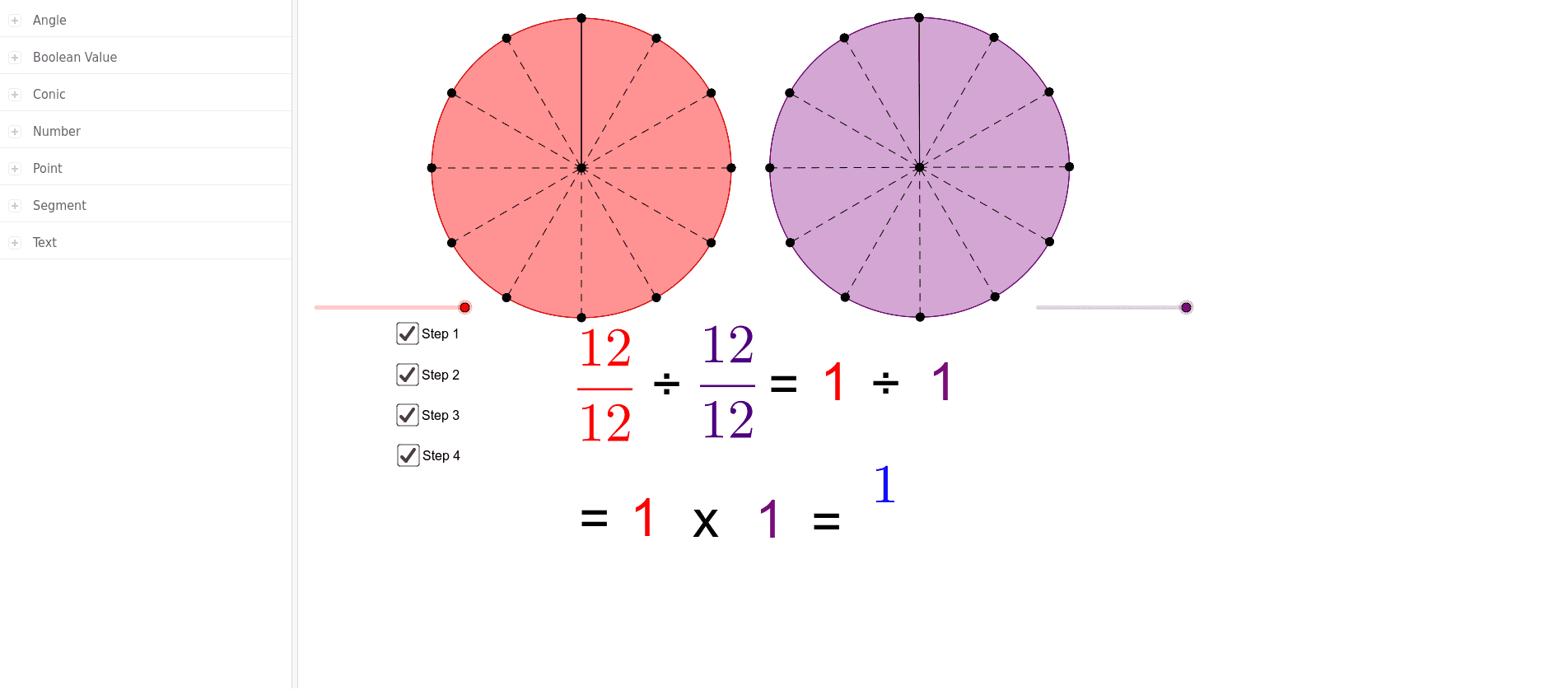
This example demonstrates how to divide one fraction with a denominator of 12 by another fraction with the same denominator. It uses a step-by-step approach to help students understand the concept of fraction division. Commands used include Circle, Point, Segment, Rotate, CircleSector, Angle, Textfield, Mirror, FractionText, and LaTeX. Suitable for upper elementary and middle school students learning fraction division.
GeoGebra Commands & Parameters
Circle(A, B) → cPoint(c) → CSegment(C, A) → fRotate(C, α, A) → C'Segment(A, C') → gCircleSector(A, C, C') → dRotate(C, 30°, A) → C'_1Angle(C, A, C'_1) → γRotate(C'_1, 30°, A) → DAngle(C'_1, A, D) → δRotate(D, 30°, A) → D'Angle(D, A, D') → εRotate(D', 30°, A) → D''Angle(D', A, D'') → ζRotate(D'', 30°, A) → D'''Angle(D'', A, D''') → ηRotate(D''', 30°, A) → EAngle(D''', A, E) → θRotate(E, 30°, A) → E'Angle(E, A, E') → ιRotate(E', 30°, A) → E''Angle(E', A, E'') → κRotate(E'', 30°, A) → E'''Angle(E'', A, E''') → λRotate(E''', 30°, A) → FAngle(E''', A, F) → μRotate(F, 30°, A) → F'Angle(F, A, F') → νSegment(C'_1, A) → hSegment(A, D) → iSegment(A, D') → jSegment(D'', A) → kSegment(A, D''') → lSegment(A, E) → mSegment(A, E') → pSegment(A, E'') → qSegment(A, E''') → rSegment(A, F) → sSegment(A, F') → tTextfield() → InputBox1Textfield(α) → InputBox2Mirror(E''', G) → IMirror(A, G) → A'Circle(A', I) → ePoint(e) → HSegment(H, A') → nRotate(H, 30°, A') → H'Angle(H, A', H') → β_1Rotate(H', 30°, A') → H''Angle(H', A', H'') → ξRotate(H'', 30°, A') → H'''Angle(H'', A', H''') → οRotate(H''', 30°, A') → JAngle(H''', A', J) → ρRotate(J, 30°, A') → J'Angle(J, A', J') → σRotate(J', 30°, A') → J''Angle(J', A', J'') → τRotate(J'', 30°, A') → J'''Angle(J'', A', J''') → υRotate(J''', 30°, A') → KAngle(J''', A', K) → ϕRotate(K, 30°, A') → K'Angle(K, A', K') → χRotate(K', 30°, A') → K''Angle(K', A', K'') → ψRotate(K'', 30°, A') → K'''Angle(K'', A', K''') → ωSegment(H', A') → aSegment(A', H'') → bSegment(H''', A') → f_1Segment(A', J) → g_1Segment(J', A') → h_1Segment(A', J'') → i_1Segment(J''', A') → j_1Segment(A', K) → k_1Segment(A', K') → l_1Segment(K'', A') → m_1Segment(A', K''') → n_1Rotate(H, β, A') → H'_1Rotate(H, β, A') → H'_2Angle(H, A', H'_2) → α_1CircleSector(A', H, H'_1) → c_1FractionText(answer) → text58LaTeX(text58, true, true) → Answer
AI Drawing Prompt Reference
Draw a circle with a center point and a point on the circumference. Connect the center to that point with a radius. Then rotate the point around the center in 30-degree increments, twelve times total, drawing a radius from the center to each new position. Between each pair of adjacent radii, fill a circular sector. Label each angle at the center. Below the figure, place two text input boxes: one for entering an angle value and one for displaying the result. Finally, to the right, draw a mirror image of the circle and its sectors, and rotate one radius by 30 degrees, labeling the corresponding angle.
The prompt above was compiled from the original drawing commands and is for reference only.