
Distance Calculation and Locus Demonstration
Loading the math board and drawing, please wait…
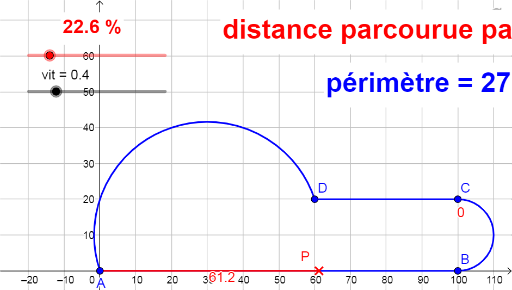
This example demonstrates constructing semicircles, line segments, and circular arcs using GeoGebra, along with calculating perimeter and trajectories. Core math concepts include perimeter computation, trigonometric functions, curve sketching, straight-line equations, and real number operations. Key GeoGebra commands used are Segment, Semicircle, Point, CircleArc, and If. Suitable for high school mathematics education, focusing on parametric equations, coordinate geometry, and dynamic geometry visualization.
GeoGebra Commands & Parameters
Segment(A, B) → fSemicircle(C, B) → cSemicircle(A, D) → dSegment(C, D) → gPoint(liste1, p) → PSegment(A, If[p < 1 / 4, P, B]) → hCircleArc(Midpoint[B, C], B, If[p < 1 / 4, B, If[p < 1 / 2, P, C]]) → eSegment(C, If[p < 1 / 2, C, If[p < 3 / 4, P, D]]) → iCircleArc(Midpoint[A, D], D, If[p < 3 / 4, D, P]) → kIf(p < 1 / 4, Length[f], If[p < 1 / 2, Length[c], If[p < 3 / 4, Length[g], Length[d]]]) → u
AI Drawing Prompt Reference
Draw a closed shape composed of two semicircles and two line segments, where the semicircles have diameters along two opposite sides of a central segment, forming an S-like outline. Place a movable point inside that travels along a hidden path. Based on the point's position, dynamically draw a segment from a fixed point to either the movable point or another fixed point, and draw a circular arc whose center is the midpoint of a segment, with radius changing according to the point's location. Finally, compute and display the length of the currently selected path (either a segment or a semicircle) depending on the point's position.
The prompt above was compiled from the original drawing commands and is for reference only.