
Discovery of Rotational Symmetry in Regular Polygons
Loading the math board and drawing, please wait…
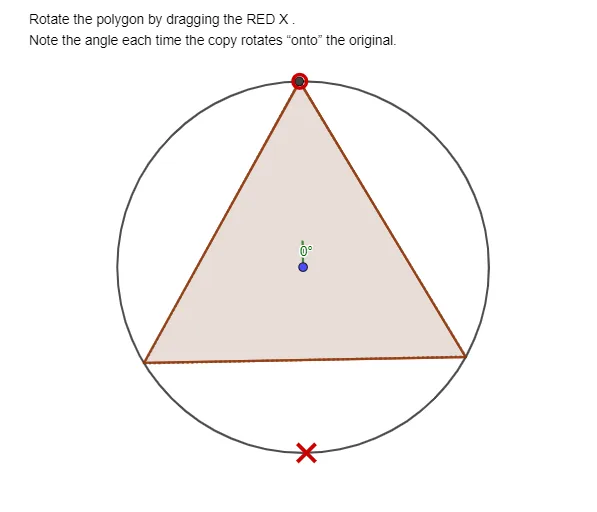
This GeoGebra example demonstrates how a regular polygon maintains its shape when rotated about its center, letting learners visually track how corresponding vertices map under successive rotations and thereby identify rotational symmetry and its order. Key concepts include regular polygons, rotational transformations, rotation angle, the uniform distribution of vertices on a circumcircle, and symmetry reasoning based on geometry. Construction overview: Circle is used to define the circumcircle (and its center), Point sets initial vertex locations, Intersect finds new intersection points on the circle to generate the rotated vertices, Polygon connects the computed vertices to form shapes such as poly1 and poly2, and Angle (with parameter α) shows or controls the rotation angle; text/labels (e.g., text1) support explanation. Suitable for middle/high school geometry lessons, classroom demonstrations, and exploratory activities focused on transformations and geometric properties.
GeoGebra Commands & Parameters
Circle(A, B) → cPoint(c) → CCircle(C, Segment[A, B]) → dPoint(c) → DCircle(D, Segment[A, B]) → eIntersect(c, e, 2) → EIntersect(c, e, 1) → FPolygon(E, F, 3) → poly1, f, g, h, GIntersect(c, d, 2) → HIntersect(c, d, 1) → IPolygon(H, I, 3) → poly2, i, j, k, JAngle(J, A, G) → α
AI Drawing Prompt Reference
Create a geometry diagram illustrating rotational symmetry of a regular polygon. Start by drawing a circle using two points to define the center, then place two initial vertex points on the circle. Construct two auxiliary circles centered at the circle’s center with radii set from the initial segment so that their intersections with the main circle yield two pairs of corresponding vertices. Connect each pair with a polygon to display two congruent polygon positions on the same circumcircle, representing vertices mapped under successive rotations. Finally, at a selected vertex of the second polygon, mark the rotation angle with an angle arc and label it as the parameter for the rotation.
The prompt above was compiled from the original drawing commands and is for reference only.