
Directional Derivative: Visualizing Slope Along Any Vector
Loading the math board and drawing, please wait…
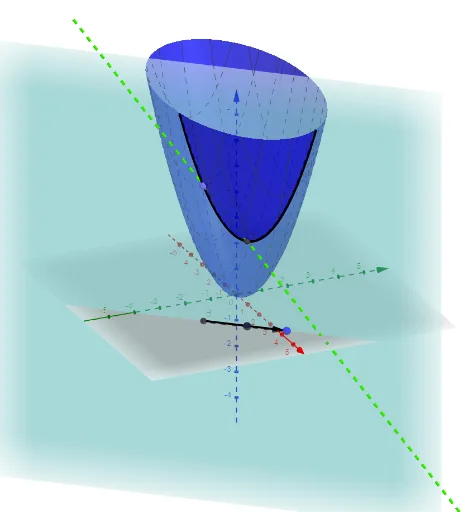
This GeoGebra example visualizes the directional derivative of a multivariable function on a 3D surface. It demonstrates that at a point A on the surface, the slope of the tangent line along a chosen direction vector u equals the directional derivative. The core mathematical concepts include partial derivatives, directional derivatives, gradients, tangent planes, and the intersection of a plane with a surface. The construction uses commands such as PointIn to place a point on the surface, Vector to define the direction u, Plane to create a vertical plane through A containing u, IntersectPath to obtain the curve g where the plane cuts the surface, and Line/Point to mark the tangent line and intersection points. By dragging the vector, learners can see how the directional derivative changes with direction. This is ideal for university-level calculus or multivariable function courses, and also serves as an intuitive introduction for advanced high school students.
GeoGebra Commands & Parameters
PointIn(f) → AVector(B, C) → uPlane(A, B, C) → aIntersectPath(a, f) → bLine(B, C) → gPoint(g) → DLine(A, E) → h
AI Drawing Prompt Reference
Draw a 3D surface of a multivariable function, place a point on the surface, attach a direction vector at that point, construct a vertical plane through the point containing the vector, intersect the plane with the surface to obtain a curve, and draw the tangent line at the point along the vector direction to illustrate how the directional derivative changes with the vector.
The prompt above was compiled from the original drawing commands and is for reference only.