
Dimensions from Volume
Loading the math board and drawing, please wait…
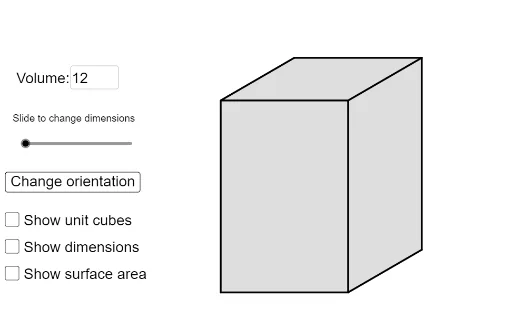
This example demonstrates how to calculate the dimensions of a 3D shape based on its volume. It involves core math concepts like volume calculation, logic, parabola, frequency distribution, multiplication, and solid geometry. Key GeoGebra commands and objects used include If, Unique, Sequence, Flatten, Reverse, Textfield, Mod, Element, Polygon, and Text. Suitable for high school and above, focusing on understanding the relationship between volume and dimensions and applying logical programming concepts.
GeoGebra Commands & Parameters
If(Defined[volumeHolder] ∧ volumeHolder > 1 ∧ IsInteger[volumeHolder], volumeHolder, 1) → volumeUnique(Sort[Sequence[If[IsInteger[volume / i], i, 1], i, 1, volume]]) → factorsOfVolumeSequence(Join[{{Element[factorsOfVolume, i]}, Unique[Sort[Sequence[If[IsInteger[volume / Element[factorsOfVolume, i] / j], j, 1], j, 1, volume / Element[factorsOfVolume, i]]]]}], i, 1, Length[factorsOfVolume]) → secondaryVolumeFlatten(Sequence[Sequence[{Element[secondaryVolume, i, 1], Element[secondaryVolume, i, 1 + j], Element[secondaryVolume, i, Length[Element[secondaryVolume, i]] + 1 - j]}, j, 1, ceil((Length[Element[secondaryVolume, i]] - 1) / 2)], i, 1, Length[secondaryVolume]]) → l1Unique(Sequence[Sort[{l1(i), l1(i + 1), l1(i + 2)}], i, 1, Length[l1], 3]) → m3Reverse(Sequence[Unique[{{Element[m3, i, 1], Element[m3, i, 2], Element[m3, i, 3]}, {Element[m3, i, 1], Element[m3, i, 3], Element[m3, i, 2]}, {Element[m3, i, 2], Element[m3, i, 1], Element[m3, i, 3]}, {Element[m3, i, 2], Element[m3, i, 3], Element[m3, i, 1]}, {Element[m3, i, 3], Element[m3, i, 1], Element[m3, i, 2]}, {Element[m3, i, 3], Element[m3, i, 2], Element[m3, i, 1]}}], i, 1, Length[m3]]) → l3Textfield(volumeHolder) → InputBox1Sequence(Unique[{{Element[m3, i, 1], Element[m3, i, 2], Element[m3, i, 3]}, {Element[m3, i, 1], Element[m3, i, 2], Element[m3, i, 3]}, {Element[m3, i, 1], Element[m3, i, 2], Element[m3, i, 3]}, {Element[m3, i, 1], Element[m3, i, 2], Element[m3, i, 3]}, {Element[m3, i, 1], Element[m3, i, 2], Element[m3, i, 3]}, {Element[m3, i, 1], Element[m3, i, 2], Element[m3, i, 3]}}], i, 1, Length[m3]) → l4Mod(10, 3) → bElement(l3, a, c) → l5Element(l5, 1) → lElement(l5, 2) → wElement(l5, 3) → hPolygon((0, 0), (l, 0), (l + ((scale * w) * cos(angle)), ((scale * w) * sin(angle))), (l + ((scale * w) * cos(angle)), ((scale * w) * sin(angle)) + h), (((scale * w) * cos(angle)), ((scale * w) * sin(angle)) + h), (0, h)) → poly2, f, g, i, j, k, mSequence(Segment[(i, 0), (i, h)], i, 1, l - 1) → lines1Sequence(Segment[(l, 0) + (((i * scale) * cos(angle)), ((i * scale) * sin(angle))), (l, h) + (((i * scale) * cos(angle)), ((i * scale) * sin(angle)))], i, 1, w - 1) → lines2Sequence(Segment[(0, h) + (((i * scale) * cos(angle)), ((i * scale) * sin(angle))), (l, h) + (((i * scale) * cos(angle)), ((i * scale) * sin(angle)))], i, 1, w - 1) → lines3Sequence(Segment[(l, i), (0, i)], i, 1, h - 1) → lines5Sequence(Segment[(i, h), (i, h) + (((w * scale) * cos(angle)), ((w * scale) * sin(angle)))], i, 1, l - 1) → lines6Sequence(Segment[(l, i), (l, i) + (((w * scale) * cos(angle)), ((w * scale) * sin(angle)))], i, 1, h - 1) → lines4Text(l, Midpoint[f] - (big / 40, big / 16)) → text1Text(w, Midpoint[g] - (big / 100, big / 16)) → text2Text("Slide to change dimensions") → text4Text(h, ((((-big)) / 20 * (floor(log(10, h)) + 1)), h / 2)) → text3