
Dilations Exploration
Loading the math board and drawing, please wait…
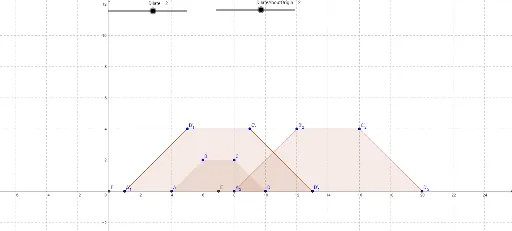
This example demonstrates the transformation of a polygon under central similarity, involving concepts like dilation, central symmetry, and coordinate geometry. It uses commands such as Polygon, Midpoint, Dilate, and Intersect to illustrate the process. Suitable for high school geometry teaching on transformations.
GeoGebra Commands & Parameters
Polygon(A, B, C, D) → poly1, a, b, c, dMidpoint(A, D) → EDilate(A, Dilate, E) → A'Dilate(B, Dilate, E) → B'Dilate(C, Dilate, E) → C'Dilate(D, Dilate, E) → D'Dilate(A, Dilate, E) → A'_1Dilate(B, Dilate, E) → B'_1Dilate(C, Dilate, E) → C'_1Dilate(D, Dilate, E) → D'_1Polygon(A'_1, B'_1, C'_1, D'_1) → poly1'_1, a'_1, b'_1, c'_1, d'_1Intersect(xAxis, yAxis) → FDilate(A, DilateAboutOrigin, F) → A'_2Dilate(B, DilateAboutOrigin, F) → B'_2Dilate(C, DilateAboutOrigin, F) → C'_2Dilate(D, DilateAboutOrigin, F) → D'_2Polygon(A'_2, B'_2, C'_2, D'_2) → poly1', a'_2, b'_2, c'_2, d'_2
AI Drawing Prompt Reference
Draw a quadrilateral ABCD, then perform a similarity transformation centered at point E to generate a new quadrilateral A'B'C'D'. Next, perform a similarity transformation centered at the origin F on quadrilateral A'B'C'D' to generate a new quadrilateral A'_2B'_2C'_2D'_2. First, draw quadrilateral ABCD, then find the midpoint E of AD, and perform a similarity transformation centered at E to generate A'B'C'D'. Finally, perform a similarity transformation centered at the origin F on quadrilateral A'B'C'D' to generate A'_2B'_2C'_2D'_2.
The prompt above was compiled from the original drawing commands and is for reference only.