
Dilation on Line Paper 4
Loading the math board and drawing, please wait…
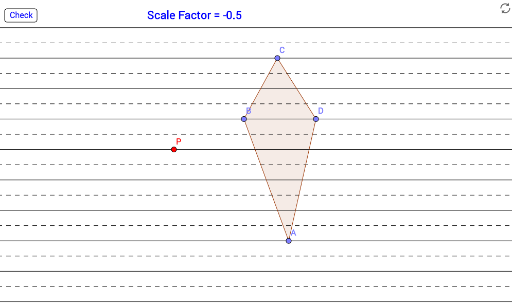
This example demonstrates the process of performing dilation on shapes on line paper; core math concepts include dilation, center, coordinate geometry, geometric construction; construction highlights involve commands/objects like Line, Point, OrthogonalLine, Intersect, LineBisector, Polygon, Dilate in GeoGebra; suitable for high school students learning geometric transformations and coordinate geometry.
GeoGebra Commands & Parameters
Line(A_2, B_2) → fLine(C_2, D_2) → gLine(E, F) → hLine(G, H) → iLine(I, J) → jLine(K, L) → kLine(M, N) → lLine(O, P_1) → mLine(Q, R) → nLine(S, T) → pLine(U, V) → qPoint(q) → F_1OrthogonalLine(F_1, q) → rIntersect(k, r) → G_1Intersect(j, r) → H_1Intersect(i, r) → I_1Intersect(r, h) → J_1Intersect(g, r) → K_1Intersect(f, r) → L_1Intersect(l, r) → M_1Intersect(r, m) → N_1Intersect(n, r) → O_1LineBisector(F_1, G_1) → sLineBisector(G_1, H_1) → tLineBisector(H_1, I_1) → aLineBisector(I_1, J_1) → bLineBisector(J_1, K_1) → cLineBisector(K_1, L_1) → dLineBisector(L_1, M_1) → eLineBisector(M_1, N_1) → f_1LineBisector(N_1, O_1) → g_1Line(W, Z) → h_1Line(A_1, B_1) → i_1Point(q) → C_1LineBisector(A_1, C_1) → j_1Point(j) → BPoint(j) → DPoint(q) → CPoint(f) → APolygon(A, B, C, D) → poly1, a_1, b_1, d_1, c_1Point(i) → PDilate(A, scaleFactor, P) → A'Dilate(B, scaleFactor, P) → B'Dilate(C, scaleFactor, P) → C'Dilate(D, scaleFactor, P) → D'Polygon(A', B', C', D') → targetPoly, a', b', c', d'
AI Drawing Prompt Reference
Draw a geometric construction on a line to demonstrate the process of dilation. Start by creating several lines and points, then find the intersections of these lines and draw the angle bisectors of the resulting angles. Next, select a center point and a scale factor, use this to dilate a quadrilateral, and draw the dilated shape, showing both the original and the transformed figures.
The prompt above was compiled from the original drawing commands and is for reference only.