
Dilation of a Point
Loading the math board and drawing, please wait…
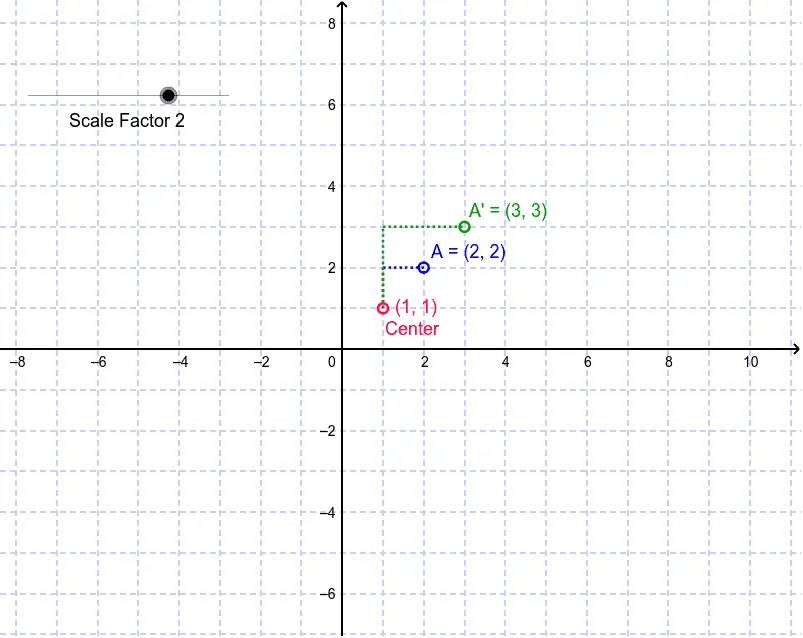
This GeoGebra example demonstrates how to perform a dilation (scaling) transformation on a point around a fixed center, and observe the resulting image point. The core mathematical concept is dilation, a similarity transformation in plane geometry, involving a scale factor, a center, and the collinearity of the original point, center, and image. The construction uses GeoGebra commands such as Segment to create segments, Dilate to transform point A into its image A', and Rotate to rotate related objects, building a complete figure with multiple points (E, G, H) and auxiliary lines (a, g, a'), along with text objects (text1, text2) for labeling. This example is suitable for upper middle school or high school students learning geometric transformations, and for teachers to use in classroom demonstrations to help students intuitively grasp the properties of dilation and its integration with rotation and segment construction.
GeoGebra Commands & Parameters
Segment(E, A_p) → aSegment(A_p, A) → gDilate(A_p, Angle, E) → GDilate(A, Angle, E) → A'Segment(G, A') → g'Rotate(E, -(Angle) * 3.141592653589793 / 180.0, E) → E'Dilate(A_p, Angle, E) → HSegment(E', H) → a'Dilate(A_p, Angle, E) → F