
Dilation of a Line
Loading the math board and drawing, please wait…
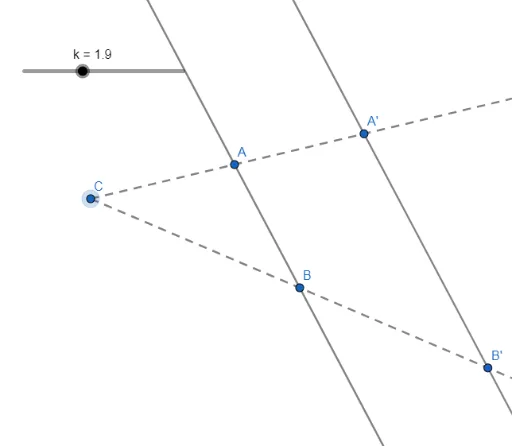
This GeoGebra example demonstrates the dilation (scaling) of a line. It shows how a line is transformed by applying a dilation centered at a point (likely the origin) with a scale factor, mapping points on the original line to new positions, resulting in a new line that is parallel to the original (or coincident if the scale factor is 1). The core mathematical concept is dilation, a similarity transformation that preserves the shape of geometric objects but changes their size and position. The construction uses GeoGebra commands: Line to create the original line f, Ray to construct auxiliary rays, and Dilate to scale key points A and B to their images A' and B', which are then connected to form the dilated line i. Additional objects (C, g, h, k) are included, possibly to control the scale factor or visualize the transformation process. This example is suitable for middle school geometry or college analytic geometry courses, helping students understand how dilation affects a line and the relationship between the original and transformed line equations.
GeoGebra Commands & Parameters
Line(A, B) → fRay(C, B) → gRay(C, A) → hDilate(A, k, C) → A'Dilate(B, k, C) → B'Line(A', B') → i
AI Drawing Prompt Reference
Draw a straight line with two key points on it. Choose a fixed point as the dilation center, and draw rays from this center through each key point. Set a scale factor, and move each key point along its ray by that factor to new positions. Connect these two new points to form a new line. The new line is parallel to the original (or coincident if the factor is 1). Include a slider to adjust the scale factor, showing how the line's position changes under dilation.
The prompt above was compiled from the original drawing commands and is for reference only.