
Dilation Exploration by scrandall (2)
Loading the math board and drawing, please wait…
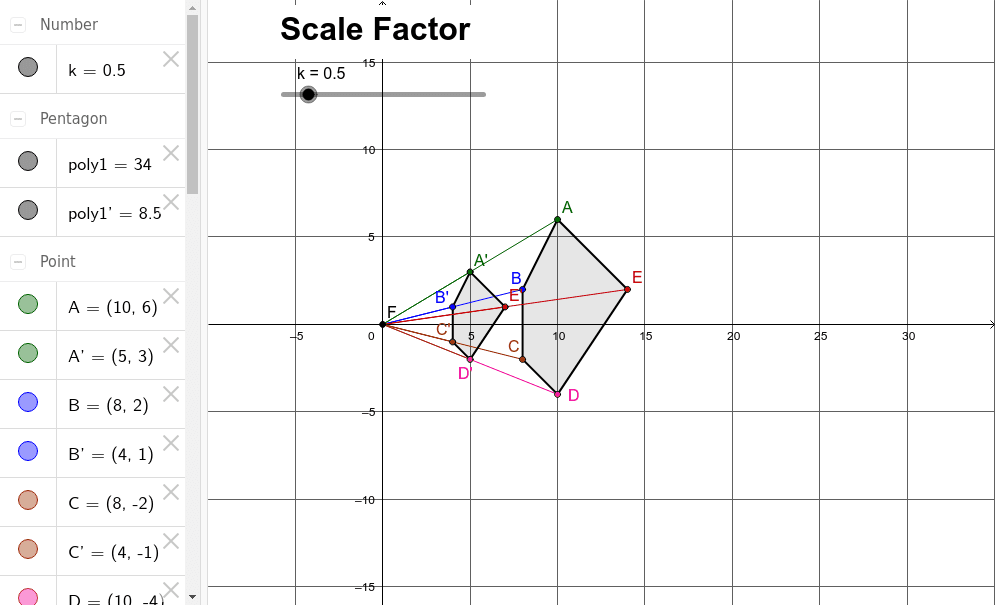
This example demonstrates the effects of geometric dilation on equilateral and scalene triangles, as well as polygons, exploring concepts like dilation, scale factor k, geometric transformations, and fractal geometry. It utilizes commands such as Polygon, Intersect, Segment, Textfield, and Dilate in GeoGebra for construction. Suitable for high school students and math enthusiasts studying geometric transformations and fractal geometry.
GeoGebra Commands & Parameters
Polygon(A, B, C, D, E) → poly1, AB, BC, CD, DE, EAIntersect(xAxis, yAxis) → FSegment(A, F) → FASegment(B, F) → FBSegment(E, F) → EFSegment(C, F) → FCSegment(D, F) → FDTextfield() → InputBox1Dilate(A, k, F) → A'Dilate(B, k, F) → B'Dilate(C, k, F) → C'Dilate(D, k, F) → D'Dilate(E, k, F) → E'Polygon(A', B', C', D', E') → poly1', A'B', B'C', C'D', D'E', E'A'Segment(F, A') → FA'Segment(F, B') → FB'Segment(F, E') → FE'Segment(F, C') → FC'Segment(F, D') → FD'
AI Drawing Prompt Reference
Draw a pentagon and mark its center point. Then, draw line segments from the center to each vertex of the pentagon. Next, scale each vertex by a given factor and connect the scaled vertices to form a new pentagon. Finally, draw line segments from the center to each vertex of the new pentagon to illustrate the effect of geometric dilation.
The prompt above was compiled from the original drawing commands and is for reference only.