
Dilation Construction Example
Loading the math board and drawing, please wait…
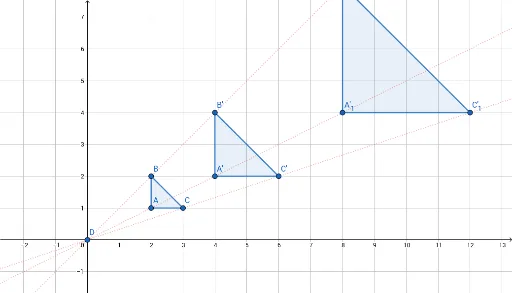
This example demonstrates how to construct a scaled version of a figure using dilation in GeoGebra. It involves core math concepts like dilation, linear equations, derivatives, fractions, planes, and median lines. Key GeoGebra commands and objects used include Polygon, Line, Dilate, Distance, and PointIn. Suitable for high school students learning geometric transformations and analytical geometry.
GeoGebra Commands & Parameters
Polygon(A, B, C) → t1, c, a, bLine(D, B) → fLine(D, A) → gLine(D, C) → hDilate(A, 2, D) → A'Dilate(B, 2, D) → B'Dilate(C, 2, D) → C'Polygon(A', B', C') → t1', c', a', b'Dilate(A, 4, D) → A'_1Dilate(B, 4, D) → B'_1Dilate(C, 4, D) → C'_1Polygon(A'_1, B'_1, C'_1) → t1'_1, c'_1, a'_1, b'_1Distance(a'_1, c'_1) → dDistance(A, a) → distanceAaPointIn(t1'_1) → Pointt1'1PointIn(t1') → Pointt1'PointIn(t1) → Pointt1
AI Drawing Prompt Reference
Draw a triangle. Choose a point outside it as the dilation center. Draw rays from this point through each vertex of the triangle. Dilate the triangle by a factor of 2 about this center, producing a second triangle whose vertices lie on the same rays beyond the original ones. Then dilate again by a factor of 4 to get a third, larger triangle. Measure the length of one side of the largest triangle, and also the distance from a vertex of the original triangle to its opposite side. Finally, place one random point inside each of the three triangles.
The prompt above was compiled from the original drawing commands and is for reference only.