
Dilation Animation
Loading the math board and drawing, please wait…
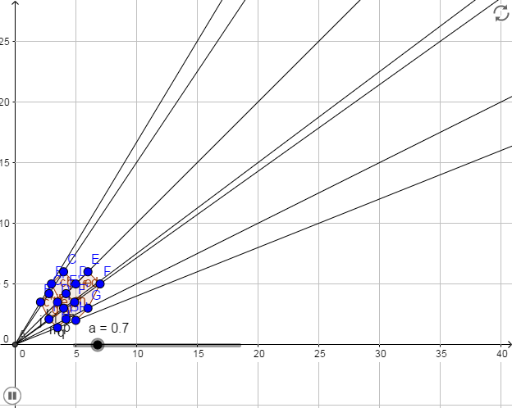
This example demonstrates the dynamic transformation process of a shape undergoing dilation. Key math concepts include dilation, geometric construction, and dynamic visualization. It utilizes GeoGebra commands and objects like Intersect, Polygon, Ray, Dilate, and elements such as points A, B, C, D, E, F, G, H, I, and polygon poly1, with sliders controlling dilation ratios to vividly show the transformation effects. Suitable for high school students learning geometric transformations and dynamic geometry.
GeoGebra Commands & Parameters
Intersect(xAxis, yAxis) → APolygon(B, C, D, E, F, G, H, I) → poly1, b, c, d, e, f, g, h, iRay(A, B) → jRay(A, C) → kRay(A, D) → lRay(A, I) → mRay(A, F) → nRay(A, G) → pRay(A, H) → qDilate(B, a, A) → B'Dilate(C, a, A) → C'Dilate(D, a, A) → D'Dilate(E, a, A) → E'Dilate(F, a, A) → F'Dilate(G, a, A) → G'Dilate(H, a, A) → H'Dilate(I, a, A) → I'Polygon(B', C', D', E', F', G', H', I') → poly1', b', c', d', e', f', g', h', i'
AI Drawing Prompt Reference
Create an animation showing the dynamic transformation of a shape undergoing dilation. Start by drawing an octagon, then use a slider to control the dilation ratio. For each vertex of the octagon, scale it along the ray from the origin to the vertex, forming a new octagon to visualize the dilation effect.
The prompt above was compiled from the original drawing commands and is for reference only.