
Dilating Shapes with Scale Factor in GeoGebra
Loading the math board and drawing, please wait…
In collections
Team 4 Dilations
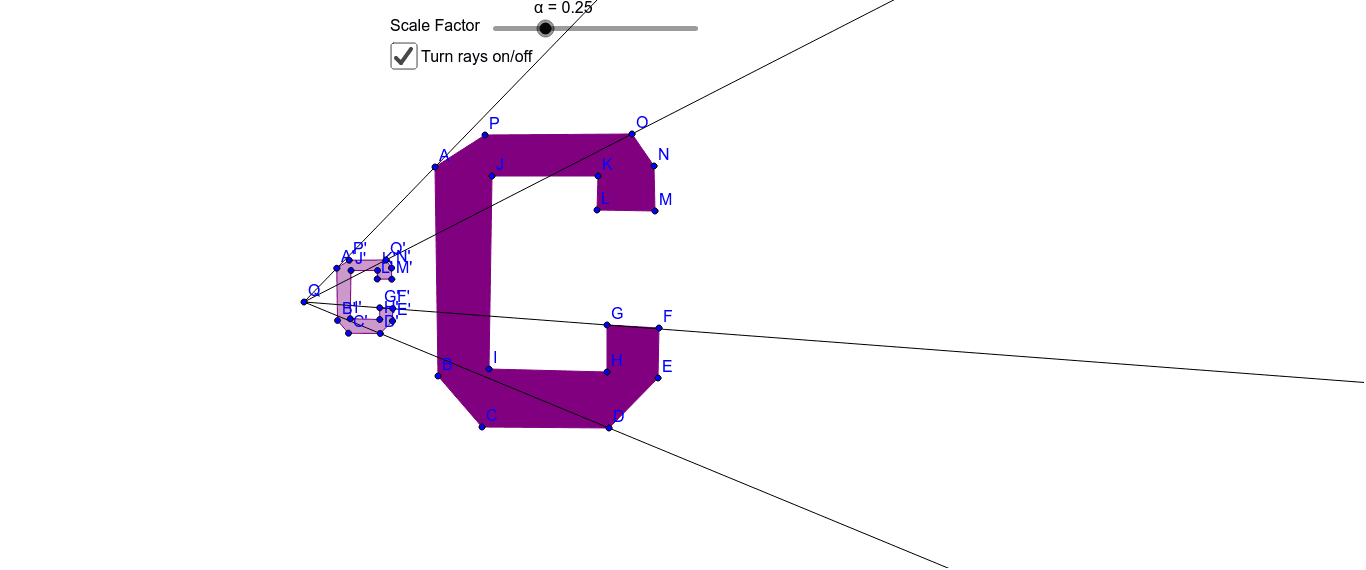
This example demonstrates how to dilate a polygon using a scale factor between 0 and 1 in GeoGebra. Key mathematical concepts include dilation transformation, scale factor, and geometric transformations. Construction involves using the Polygon command to create shapes, applying the Dilate command with the scale factor, and utilizing the Ray command to display scaling rays. Suitable for middle school students learning geometric transformations and shape scaling, useful for classroom demonstrations and self-study.
GeoGebra Commands & Parameters
Polygon(A, B, K, L, M, N, O, P, C, D, E, F, G, H, I, J) → poly1, a, j, k, l, m, n, o, p, b, c, d, e, f, g, h, iDilate(A, α, Q) → A'Dilate(B, α, Q) → B'Dilate(C, α, Q) → C'Dilate(D, α, Q) → D'Dilate(E, α, Q) → E'Dilate(F, α, Q) → F'Dilate(G, α, Q) → G'Dilate(H, α, Q) → H'Dilate(I, α, Q) → I'Dilate(J, α, Q) → J'Dilate(K, α, Q) → K'Dilate(L, α, Q) → L'Dilate(M, α, Q) → M'Dilate(N, α, Q) → N'Dilate(O, α, Q) → O'Dilate(P, α, Q) → P'Polygon(A', B', K', L', M', N', O', P', C', D', E', F', G', H', I', J') → poly1', a', j', k', l', m', n', o', p', b', c', d', e', f', g', h', i'Ray(Q, O) → qRay(Q, G) → rRay(Q, D) → sRay(Q, A) → t
AI Drawing Prompt Reference
Draw an irregular polygon with many vertices. Choose a point as the center of dilation. Set a scale factor between 0 and 1. First draw the original polygon. Then draw rays from the center to each vertex of the polygon. On each ray, mark a new point at the scaled distance from the center. Connect these new points to form a smaller, similar polygon. Keep the original polygon, the center, the rays, and the scaled polygon visible. Add a slider to adjust the scale factor dynamically.
The prompt above was compiled from the original drawing commands and is for reference only.