
Dilating Lines and Angles with Similarity Transformation (GeoGebra)
Loading the math board and drawing, please wait…
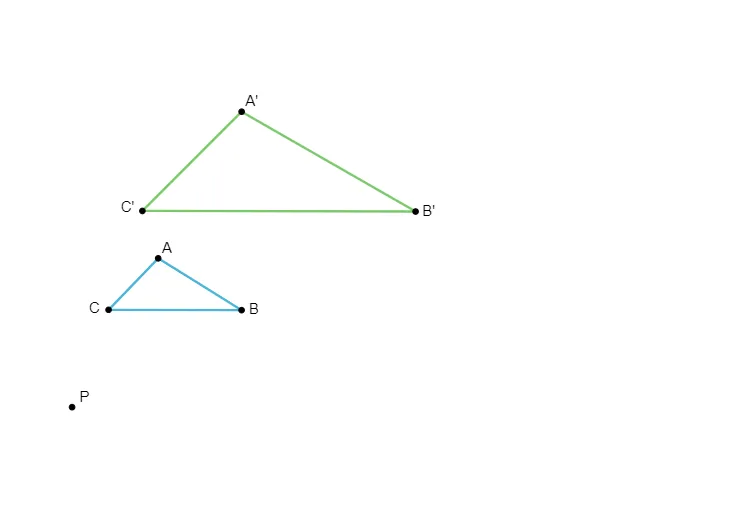
This example demonstrates how to dilate (enlarge or reduce) geometric figures by a similarity transformation, focusing specifically on how lines and angles behave under scaling. The key math ideas are similarity, similarity transformation (with a center and scale factor), and the angle/correspondence properties that remain consistent after dilation. In the construction, GeoGebra uses polygon geometry (Polygon) and a set of named points (e.g., C, D, E, F, G, H, I plus parameter/auxiliary points such as t1, t2, e/c/d, h/f/g) to build the pre-image shape and its image under dilation. The resulting configuration lets learners visually verify how corresponding sides lie on dilated lines while the angle structure is preserved through the transformation. Suitable for middle and high school geometry lessons, classroom demonstrations, and inquiry-based exploration of similarity transformations.
GeoGebra Commands & Parameters
Polygon(C, D, E) → t1, e, c, dPolygon(F, G, H) → t2, h, f, g
AI Drawing Prompt Reference
On a drawing canvas, first create a triangle using three named points, keeping its edges and angle relationships visible. Then create a second triangle using another set of three points on the same canvas. The goal is to illustrate, from the perspective of a similarity transformation (dilation), that corresponding sides align with the dilated line directions and that the angle structure remains consistent after scaling. Construct in order: draw the first triangle from its three points, then draw the second triangle from its three points.
The prompt above was compiled from the original drawing commands and is for reference only.