
Different Nets of a Cube by Melissa
Loading the math board and drawing, please wait…
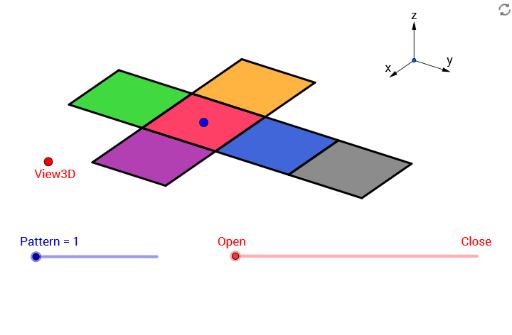
This example demonstrates various nets of a cube, involving core math concepts like solid geometry, polygon construction, and spatial transformations. It utilizes GeoGebra commands such as Vector, Translate, OrthogonalLine, Polygon, Midpoint, Segment, and Mirror. Ideal for high school students learning about 3D geometry and spatial visualization skills.
GeoGebra Commands & Parameters
Vector(B_1, Z) → wVector(B_1, Y) → vVector(B_1, X) → uTranslate(A, Vector[(2 * v)]) → A'Translate(P, Vector[(2 * v)]) → P'OrthogonalLine(View3D, yAxis) → a_1OrthogonalLine(View3D, xAxis) → b_1Polygon(L, K, N, M) → poly1, l, k_1, n, mPolygon(K, P, Q, N) → poly2, k_2, p, q, n_1Polygon(L, M, S, R) → poly3, l_1, m_1, s, rPolygon(N, V, W, M) → poly4, n_2, v_1, w_1, m_2Polygon(K, T, U, L) → poly5, k_3, t, u_1, l_2Polygon(B, Q, P, A) → poly6, b_2, q_1, p_1, a_2Midpoint(R, M) → DTranslate(S, Vector[(-((2 * v)))]) → S'Segment(S, C) → eTranslate(M, Vector[(-2 * v)]) → M'Segment(M, E) → fSegment(E, C) → hTranslate(N, Vector[(-2 * v)]) → N'Translate(Q, Vector[(-2 * v)]) → Q'_1Segment(Q, F) → iSegment(N, G) → jSegment(G, F) → d_1Translate(Q, Vector[(-2 * v)]) → Q'_2Translate(B, Vector[(-2 * v)]) → B'_1Segment(B, I) → e_1Segment(I, H) → f_1Segment(H, Q) → g_1Translate(K, Vector[(2 * v)]) → K'Translate(P, Vector[(2 * v)]) → P'_1Segment(P, J) → h_1Segment(J, A_1) → i_1Segment(A_1, K) → j_1Segment(B, H_1) → s_1Segment(H_1, C_1) → cSegment(C_1, A) → r_1Midpoint(N, P) → D_1Midpoint(k_1) → F_1Segment(A, G_1) → t_1Segment(G_1, I_1) → c_2Segment(I_1, P) → d_2Segment(J, K_1) → f_2Segment(P, L_1) → e_2Segment(L_1, K_1) → g_2Segment(M, W) → h_2Mirror(L_1, F_1) → O_1Mirror(K_1, F_1) → P_1Segment(M, M_1) → i_2Segment(N_1, J_1) → j_2Segment(J_1, M_1) → p_2Polygon(M, E, C, S) → poly7, q_2, r_2, s_2, t_2Polygon(Q, N, G, F) → poly8, q_3, n_3, g_3, f_3Polygon(B, Q, H, I) → poly9, b_3, q_4, h_3, i_3Polygon(J, A_1, K, P) → poly10, j_3, a_3, k_4, p_3Polygon(C_1, A, B, H_1) → poly11, c_3, a_4, b_4, h_4Polygon(G_1, I_1, P, A) → poly12, g_4, i_4, p_4, a_5Polygon(K_1, J, P, L_1) → poly13, k_5, j_4, p_5, l_3Polygon(M, M_1, J_1, N_1) → poly14, m_3, m_4, j_5, n_4
AI Drawing Prompt Reference
Draw various nets of a cube, showing different folding methods. Start by drawing three squares side by side, then connect corresponding edges to form six connected squares, creating a cube net. Use spatial transformations and mirror operations to generate multiple different nets, demonstrating the diversity of cube unfoldings.
The prompt above was compiled from the original drawing commands and is for reference only.